

📋 Customer Orders
Estimated time: 10 minutes
Level: 🟡 Medium
The step between budget and delivery
🎯 What is an order?
An order is a delivery commitment:
- Client has said "I want this"
- You say "I'll deliver it to you on day X"
- The stock is reserved for him
Example:
Client approves maintenance budget.
Monthly order is created.
Every month, the invoice is automatically generated.
The technician sees the visitor on his route.
📝 Origin of orders
Orders can come from:
| Origin | How it is created | Example |
|---|---|---|
| Budget | Client approves budget | Annual maintenance |
| Manual | You create it directly | Telephone order |
| Web/Portal | Customer buys online | Product purchase |
| Recurring | System generates it automatically | Monthly replacements |
| POS | Sale to deliver later | Buy in store, ship to home |
📝 STEP 1: Create manual order
When:
Client calls you: "I need 50kg of chlorine for next week."
How:
- Go to Sales → Orders
- Press "New Order"
- Fill:
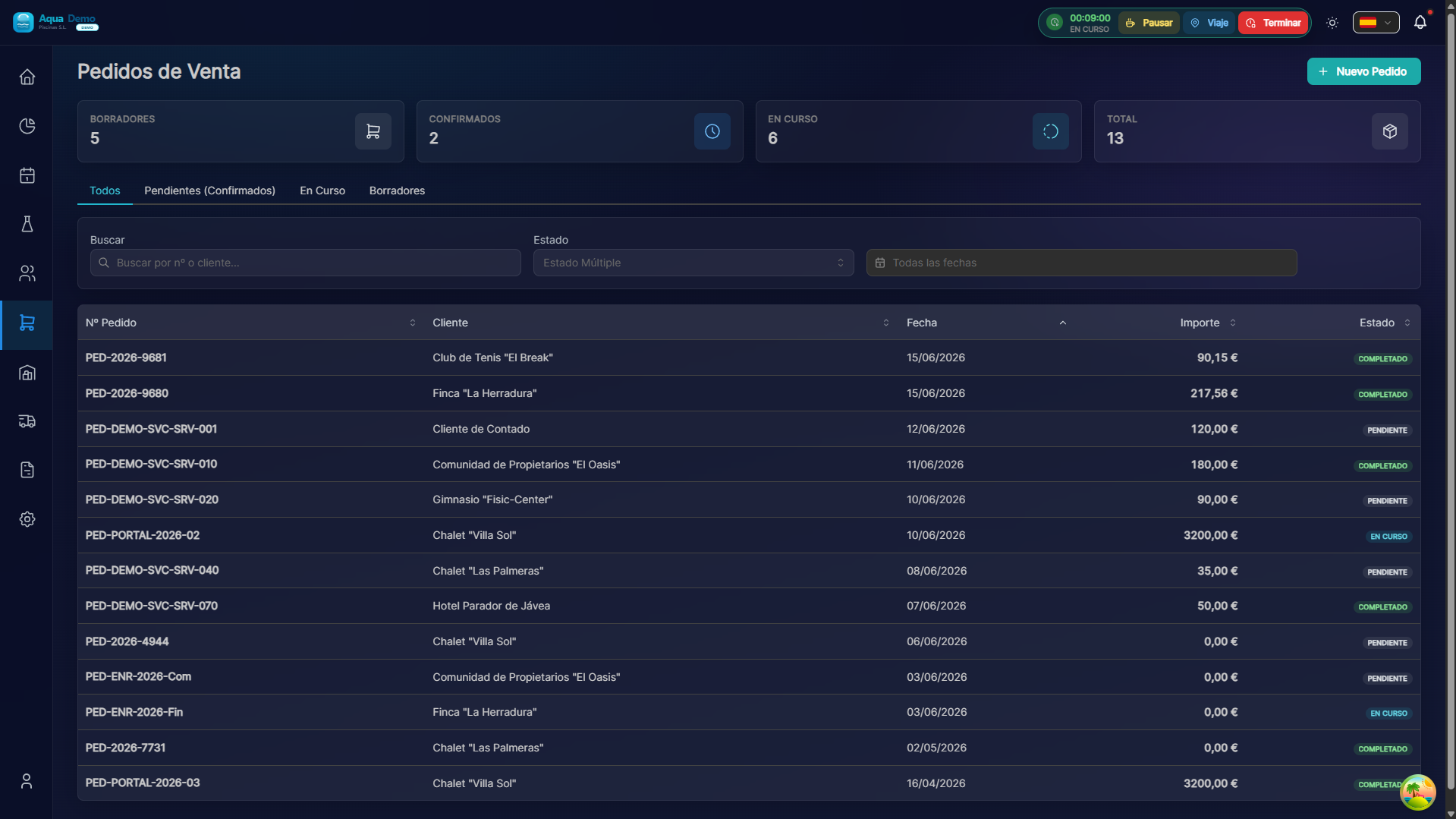
Captura con datos demo AquaDemo.Capture with AquaDemo demo data.
📊 Status of an order
FLUJO DE ESTADOS:

🟡 PENDIENTE → 🟠 PREPARANDO → 🟣 LISTO → 🟢 ENTREGADO → ⚪ FACTURADO
     ↑              ↑              ↑            ↑
   Entra en      Albarán         Todo         Cliente
sistema interno preparado lo recibe| Status | Meaning | What you can do |
|---|---|---|
| 🟡 Pending | Newly created | Edit all, cancel |
| 🟠 Preparing | Someone is preparing it | View, do not edit products |
| 🟣 Ready | Ready, wait for shipment | Send/deliver |
| 🔵 Sent | On the way | See tracking |
| 🟢 Delivered | Client received it | Create invoice |
| ⚪ Invoiced | It has already been invoiced | See associated invoice |
| 🔴 Cancelled | Canceled | Archived |
📦 STEP 2: Prepare order (picking)
When an order goes to "Preparing":
For the warehouse:
┌─────────────────────────────────────────────┐
│  ALBARÁN DE PREPARACIÓN #P-2024-0089       │
├─────────────────────────────────────────────┤
│                                             │
│  Pedido: #PC-2024-0156                      │
│  Cliente: Hotel Costa del Sol               │
│  Entrega: 25/01/2024                        │
│                                             │
│  PREPARAR:                                 │
│  ☐ 2 x Cloro granulado 25kg (ubicación A3) │
│  ☐ 4 x pH- minorador 5L (ubicación B1)     │
│  ☐ 6 x Algicida 1L (ubicación C7)          │
│                                             │
│  Preparado por: _______________            │
│  Fecha: _______________                    │
│                                             │
│  [✅ Marcar como Listo]                    │
└─────────────────────────────────────────────┘
What the system does:
- Subtraction from available stock (reserve)
- Generate preparation note
- Notify that it is ready
🚚 STEP 3: Deliver/send
Option A: Route Delivery
The technician takes him in his van:
- Order appears in your app
- Bring the products
- At the pool, delivery and signature
- Mark as "Delivered" in app
Option B: Shipping by courier
- Prepare package
- Print shipping label
- Give it to the carrier
- You add tracking number
- Status: "Sent"
Option C: Pick up in store
- Customer comes to your store/warehouse
- You deliver the order
- Receipt signature
- Mark as "Delivered"
⚠️ Orders with problems
Out of stock:
💡 Management Tips
Tip 1: Prioritize
Orders with delivery today first. Use date filters.
Tip 2: Group
If there are 3 orders for the same neighborhood, deliver them together.
Tip 3: Confirm
Call the client before you go: "Is he home? Can I come in?"
Tip 4: Minimum stock
If you see that many orders are out of stock, it's time to buy.
❓ Frequently asked questions
"Can I invoice before delivering?"
Yes, but it is not usual. It is usually delivered first.
"What happens if the customer cancels?"
Stock is available again. The order is marked "Cancelled".
"Can I place an order out of stock?"
Yes, it remains as "Back in stock" until it arrives.
"Does the technician see the orders on his route?"
Yes, orders for delivery that day appear in the app.
✅ Order checklist
When creating:
- [ ] Correct customer and address
- [ ] Revised products and quantities
- [ ] Realistic delivery date
- [ ] Contact telephone number included
When preparing:
- [ ] Sufficient stock checked
- [ ] Reviewed products (expiration dates...)
- [ ] Proper packaging
- [ ] Documentation included
Upon delivery:
- [ ] Customer confirms receipt
- [ ] Signature or delivery photo
- [ ] Status updated in system
- [ ] Invoice generated