

🏦 SEPA Remittances
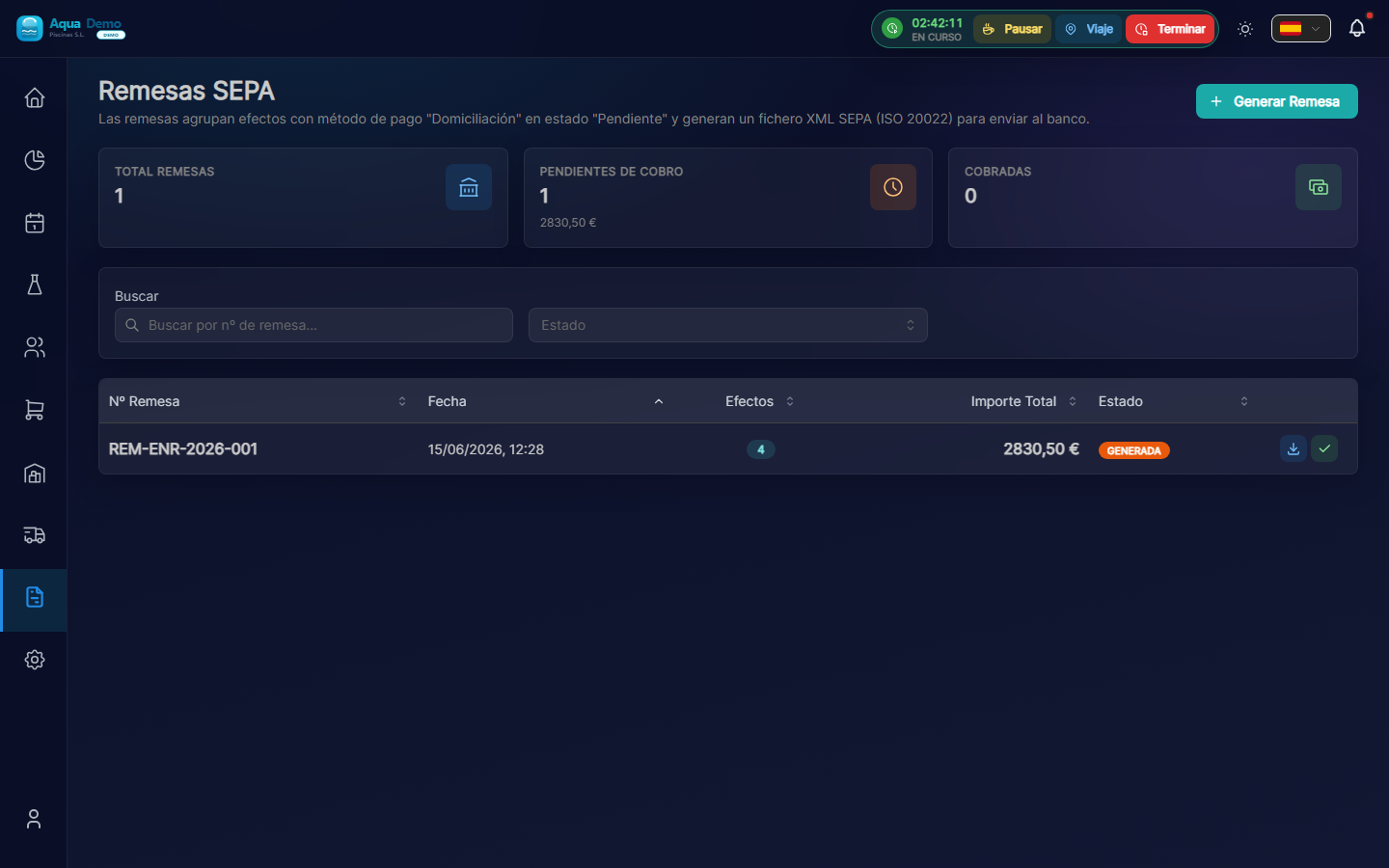
Captura con datos demo AquaDemo.Capture with AquaDemo demo data.
TL;DR
SEPA (Single Euro Payments Area) allows you to collect invoices directly from your clients' bank account. You generate an XML file, upload it to your bank, and the bank debits the money from your customers' accounts automatically.
What is it for?
Advantages of SEPA charging:
- ⚡ Fast - The money comes in alone, without calling or waiting
- 📅 punctual - Payments are made on the scheduled date
- 💰 Economic - Lower bank fees than transfers
- 🎯 Efficient - A single file for hundreds of charges
What you need:
- ✅ SEPA mandate signed by each client (authorization)
- ✅ Client bank details (IBAN)
- ✅ Agreement with your bank for debits
🟢 Create a SEPA Remittance
Step 1: Select invoices to collect
- Go to Billing → Remittances → New
- The system shows invoices pending collection
- Select the ones you want to include:
- Manually (checkbox)
- Automatically (all due X day)
- Per client (all effects of a client)
Step 2: Set up remittance
Complete the data:
| Field | What to wear | Example |
|---|---|---|
| Charge Date | When will the bank collect | 02/05/2025 |
| Type | First or recurring collection | Recurring |
| Bank account | Your account where the money comes in | ES12 1234 5678 ... |
| Concept | Customer reference | "Maintenance invoice Jan" |
⚠️ The charge date must be a business day and at least 2 days in advance
Step 3: Generate XML
- Click 📄 Generate XML
- The system creates the file in SEPA format pain.008.001.02
- Download the file to your computer
📄 REMESA_SEPA_20250205.XML

Contenido:
├─ Nº Remesa: REM-2025-0023
├─ Fecha presentación: 2025-02-03
├─ Fecha cargo: 2025-02-05
├─ Total operaciones: 45
├─ Importe total: 12.450,00 €
└─ Transacciones:
   ├─ Cliente A - 150,00 € - ES12...
   ├─ Cliente B - 320,00 € - ES34...
   └─ ...
🟡 Upload to the Bank
Each bank has its platform, but the process is similar:
- Enter your company's online banking
- Go to Debits → Submit remittance
- Upload the generated XML file
- Verify that the bank accepts it (without errors)
- Confirm the submission
💡 Some banks allow direct API - System can send automatically (advanced settings).
📊 Remittance Status
CICLO DE VIDA DE UNA REMESA

🟡 GENERADA
   └─ XML creado, pendiente de subir al banco

🟠 PRESENTADA
   └─ Subida al banco, esperando fecha de cargo

🔵 EN PROCESO
   └─ Banco está ejecutando los cargos

✅ COBRADA
   └─ Dinero en tu cuenta
   └─ Facturas marcadas como pagadas

⚠️ PARCIAL
   └─ Algunos cargos rechazados
   └─ Revisar incidencias

❌ RECHAZADA
   └─ Error en el archivo o condiciones
   └─ Corregir y volver a presentar
🔴 Manage Rejections
Sometimes the customer's bank rejects the charge:
Common reasons for rejection
| Code | Reason | What to do |
|---|---|---|
| AC01 | Wrong IBAN | Request correct bank details |
| AC04 | Account canceled | Request a new account or another payment method |
| AC06 | Account blocked | Contact customer, use another method |
| MD01 | Without mandate | The client revoked the mandate |
| MD02 | Incorrect command | Review mandate reference |
| MS02 | Customer order | The client ordered not to pay |
| MS03 | Unspecified reason | Contact client |
| RR01-04 | Regulatory | Required information missing |
Rejection process
- The bank notifies you (usually within 2-3 days)
- Enter PoolControl → Billing → Remittances → Rejections
- Review the reason for the rejection
- Action according to case:
- Incorrect data → Correct and reprogram
- Without funds → Contact client
- Revocation → Switch to another payment method
📋 Mandate Management
Before charging for SEPA you need a mandate signed by the client.
Create command
- Go to Billing → SEPA Mandates → New
- Select the client
- The system generates the document with:
- Unique mandate reference
- Client data (name, ID, address)
- IBAN of the account
- Type of debit (single or recurring)
- Signature date
Command States
MANDATOS SEPA

🟠 PENDIENTE DE FIRMA
   └─ Generado, esperando que cliente firme

🟢 ACTIVO
   └─ Firmado y registrado
   └─ Puede usarse para cobros

🔴 CANCELADO
   └─ Cliente revocó el mandato
   └─ No se pueden hacer más cargos

⚫ EXPIRADO
   └─ Mandato único ya usado
   └─ O recurrente sin uso en 36 meses
💡 Pro Tips
💡 Mandatory pre-notification The customer must receive notice 14 days before the first charge (only the first). Appellants do not need prior notice if it is in the contract.
💡 Important deadlines
- Submit remittance: Minimum 2 business days before the charge
- Non-business days: The bank delays the next business day
- Rejections: You have 5 business days to claim
💡 Automatic reconciliation Configure that when the bank confirms the remittance, the invoices are marked as paid automatically.
💡 Paid Backup If SEPA fails, have an automatic email configured to the customer: "Problem with the charge, please pay by transfer."
❓ Frequently Asked Questions
Can I cancel a submitted remittance? Only before the charge date. Once in process, you must wait for it to finish and manage rejections.
How long does it take for the money to arrive?
- You present remittance on Monday
- Charge on Wednesday
- Money in account: Wednesday or Thursday (same day or next)
What happens if the client does not have funds? The charge is rejected (code AM04). The bank charges you a rejection fee (0.50-€2). You must contact the client.
Can I charge clients from other countries? SEPA covers the entire Euro zone + some European countries. UK is no longer included post-Brexit (you need another system).
See also
- Payment Portfolio - Expiration management
- Payment Registration - Manual collections
- Recurring Billing - Full automation
Flow of a Remittance (Diagram)
TÚ                          BANCO                       CLIENTE
 │                            │                           │
 │ 1. Generas remesa XML      │                           │
 │ 2. Sube a banca online     │                           │
 │───────────────────────────>│                           │
 │                            │ 3. Valida formato         │
 │                            │ 4. Programa cargos        │
 │                            │                           │
 │                            │ 5. Día del cargo:         │
 │                            │    Intenta cargar cuenta  │
 │                            │──────────────────────────>│
 │                            │                           │ 6. Si hay fondos: OK
 │                            │<──────────────────────────│    Si no: RECHAZO
 │                            │                           │
 │                            │ 7. Transfiere dinero a ti │
 │<───────────────────────────│                           │
 │ 8. Recibes confirmación    │                           │
 │ 9. Concilias en sistema    │                           │
SEPA XML Structure (Summary)
<?xml version="1.0" encoding="UTF-8"?>
<Document xmlns="urn:iso:std:iso:20022:tech:xsd:pain.008.001.02">
  <CstmrDrctDbtInitn>
    <GrpHdr>
      <MsgId>REM20250205001</MsgId>
      <CreDtTm>2025-02-03T10:00:00</CreDtTm>
      <NbOfTxs>45</NbOfTxs>
      <CtrlSum>12450.00</CtrlSum>
    </GrpHdr>
    <PmtInf>
      <PmtInfId>LOTE001</PmtInfId>
      <PmtMtd>DD</PmtMtd>
      <BtchBookg>false</BtchBookg>
      <NbOfTxs>45</NbOfTxs>
      <CtrlSum>12450.00</CtrlSum>
      <PmtTpInf>
        <SvcLvl>
          <Cd>SEPA</Cd>
        </SvcLvl>
        <LclInstrm>
          <Cd>CORE</Cd>
        </LclInstrm>
      </PmtTpInf>
      <ReqdColltnDt>2025-02-05</ReqdColltnDt>
      <Cdtr>
        <Nm>Tu Empresa S.L.</Nm>
      </Cdtr>
      <CdtrAcct>
        <Id>
          <IBAN>ES12...</IBAN>
        </Id>
      </CdtrAcct>
      <!-- Aquí van las transacciones (DrctDbtTxInf) -->
    </PmtInf>
  </CstmrDrctDbtInitn>
</Document>