

👥 Clients and Pools
What are you going to learn here? Everything you need to register clients, manage their pools and configure how you work with them. From scratch, without taking anything for granted.
Where is it in the app
| What | How to get there |
|---|---|
| Client list | Operational → Clients and Pools (/app/pool-control/clients) |
| Zones | Operational → Geographical Zones |
| Approve GPS of the technician | Operational → Coord. Earrings |
| Keys (office) | Operational → Keys (/keys) |
| Typical permissions | CLIENT_VIEW_BASIC, CLIENT_CREATE, CLIENT_EDIT_BASIC |
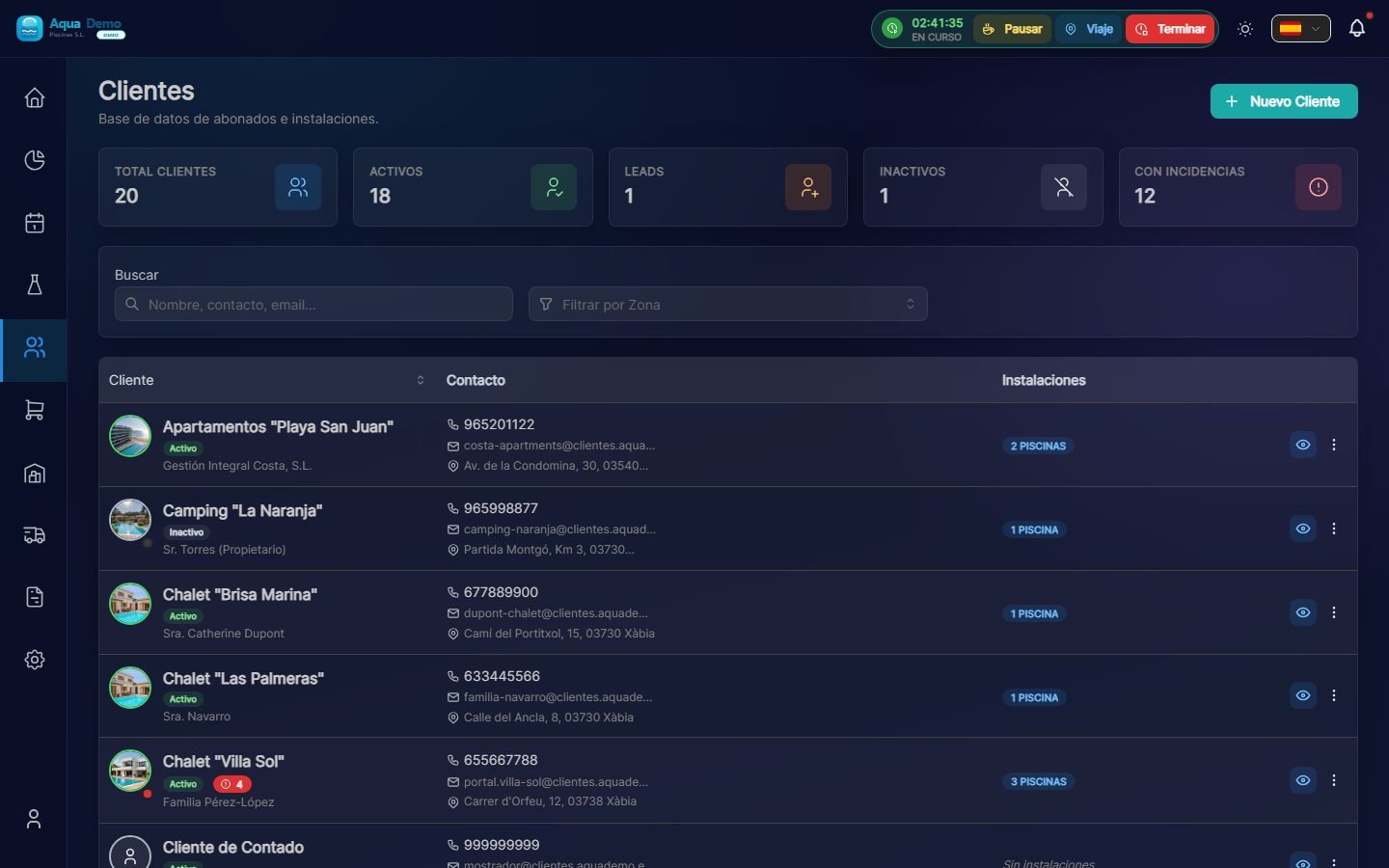
Captura con datos demo AquaDemo.Capture with AquaDemo demo data.
🎯 What is this section?
This section of the program is responsible for saving the information about who pays you (clients) and where you work (swimming pools).
Imagine that you have a notebook...
In your lifelong notebook, you surely have:
- A list with the names of your clients
- Your phones
- The addresses of the swimming pools
- Maybe notes like "Mr. García likes us to go in the morning"
PoolControl does the same thing, but in an organized and digital way. This way you don't forget anything and the entire team can see the information.
🏗️ VERY important concepts (read it carefully)
1️⃣ Client vs Pool
This is the most important difference you need to understand:
| Concept | What is it | Real example |
|---|---|---|
| CLIENT | The person or company that PAYS the invoice | "Hotel La Palmera S.L." |
| POOL | The physical place where you WORK | "Main pool of Hotel La Palmera" |
Why is it important?
A customer can have SEVERAL pools, but pays ONE bill.
Practical example:
- Hotel La Palmera has:
- Large pool (adults)
- Small pool (children)
- Jacuzzi
- You do the work in 3 different places
- But invoices 1 time to Hotel La Palmera
💡 Trick
You always think: "Who pays me?" (that's the customer) vs "Where do I clean?" (that's the pool)
2️⃣ Types of Client
PoolControl classifies clients into 3 types:
🟢 Active
- What does it mean: Client you are currently serving
- When to use it: When you already have a contract and you are going to clean your pools
- Color: Green
- Example: The Hotel La Palmera, where you go every Monday
🟠 Lead (Potential)
- What does it mean: Client who has called you, but has not yet hired you
- When to use it: When you are negotiating the price or waiting for a decision
- Color: Orange
- Example: The El Sol Neighborhood Community that asked you for a quote but has not yet said yes
⚫ Inactive
- What does it mean: Client who stopped working with you
- When to use it: When you no longer provide service (because the contract ended, you did not pay, etc.)
- Color: Gray
- Example: The Sports Club that closed last year
⚠️ IMPORTANT
Do not delete inactive clients. Just mark them as "Inactive". This way you keep the history of invoices and visits just in case.
3️⃣ The 3 Payment Methods (This is key!)
There are 3 ways to charge a customer. You must choose one when registering, because it affects how invoices are generated.
| Mode | How does it work? | When to use it? | Example |
|---|---|---|---|
| ALL INCLUSIVE | Pay a fixed monthly fee. The products are included. | Clients who want predictability | "€150/month and I don't worry about anything else" |
| FEE + CONSUMPTION | Pay a small fee + separately pay what you spend on products | Customers who want to pay only what they spend | "€50/month + whatever you spend on chlorine" |
| SERVICE ONLY | You only pay for the work. The products are yours. | Customers who prefer to buy chemicals themselves | "You pay me to come, you buy the chlorine" |
Visual comparison:
📦 TODO INCLUIDO:
   Cuota: ████████████████ 150€
   Productos: Incluidos (0€ extra)
   Total: 150€

📊 CUOTA + CONSUMOS:
   Cuota: ██████ 50€
   Productos: ██ Variable (~30€)
   Total: ~80€

🔧 SOLO SERVICIO:
   Cuota: ██████████ 100€
   Productos: Cliente los compra
   Total: 100€ (para ti)
⚠️ ATTENTION!
If you configure this incorrectly, you may be giving away products or undercharging. Read the complete guide on Client Profile to understand it well.
📋 What can you do in this section?
✅ Register clients
- Create a file with name, telephone, email, tax address
- Choose customer type (Active, Lead, Inactive)
- Configure payment mode
✅ Manage pools
- Add one or more pools to each client
- Enter the exact address of each pool
- Configure GPS so that technicians arrive safely
- Define what tasks are done in each pool
- Configure which parameters are measured (pH, chlorine...)
✅ Organize by zones
- Create geographic zones ("North Zone", "Center", "Urbanizations")
- Assign pools to zones
- See coverage map
✅ Set up commercial
- Put special discounts per client
- Set different prices for each one
- Add notes ("The doorman has the key", "Be careful with the dog")
🗺️ Navigation map of this section
📁 CLIENTS & POOLS
│
├── 📋 [Client Management](./client-management)
│   └── How to create, edit and search clients
├── 📄 [Client Profile](./client-detail)
│   └── Advanced settings: billing modes, discounts, notes
├── 🏊 [Pool Catalog](./pool-catalog)
│   └── Add and configure pools
└── 📍 [GPS System](./gps-coordinates)
    └── How to set exact coordinates
🎓 Glossary of this section
| Word | What does it mean in human |
|---|---|
| Client | Who pays the bill |
| Pool | Where do you do physical work |
| Lead | Potential client (not yet hired) |
| GPS | Coordinates so that the mobile phone can take you exactly |
| Zone | Geographic grouping (neighborhoods, cities...) |
| Fee | Fixed monthly payment |
| Consumptions | Chemicals you use |
| All Inclusive | Fee that includes products |
🚀 Where do I start?
If you are new to PoolControl:
👉 Go to Client Management to learn how to create your first client step by step.
If you already have clients but want to configure better:
👉 Go to Client Profile to understand the payment methods and discounts.
If your technicians get lost getting to the pools:
👉 Go to GPS System to learn how to set exact coordinates.
💡 Remember
Customer = Who paysPool = Where you work
A customer may have many pools, but receives only one bill.