

Technical route summary
| Screen | Route |
|---|---|
| My Route | /my-route |
| My Van | /my-stock |
| My Keys | /my-keys |
| Scan QR | /scan-qr |
| Part | /visits/{id} |
🔧 Technician App
What are you going to learn here? How your workers use the application on their mobile. Everything they see and do on the street.
🎯 Who is this guide for?
This section is for:
- Technicians who are going to use the app on their mobile
- Administrators who want to understand what technicians see
- Managers who need to explain to technicians how it works
🏗️ What is the Technician App?
The Technician App is the version of PoolControl that is used on mobile.
Key differences:
| Version | Where is it used | For what |
|---|---|---|
| Web Version (computer) | Office/home | Plan, configure, view reports |
| Technical App (mobile) | On the street | See routes, fill in parts, use offline |
What can a technician do?
- 📍 See your route for the day (which pools you get)
- 🗺️ Navigate with GPS to each pool
- 📋 Fill out the work report (pH, tasks, products)
- 📸 Take photos of incidents
- 📦 View your stock in the van
- 🔄 Request more material
- 🔔 View change notifications
What can't a technician do?
- ❌ See pools from other technicians
- ❌ See prices or invoices
- ❌ Change your own route (only request transfers)
- ❌ Create new clients
- ❌ See the full calendar
📱 How to access the app?
Option 1: By browser (recommended)
- Open Chrome/Safari on your mobile
- Go to https://poolcontrolpro.com/login and log in (same website as the office; on mobile you can add direct access / PWA).
- Log in with email and password
- Ready!
Option 2: Install as app (PWA)
- Open the website in Chrome
- Menu (⋮) → "Add to home screen"
- An icon appears as another app
- Open from there next time
💡 Advantage of installing it
It looks full screen, without an address bar, like a normal app.
🖥️ What does the app look like?
Bottom menu (main navigation)
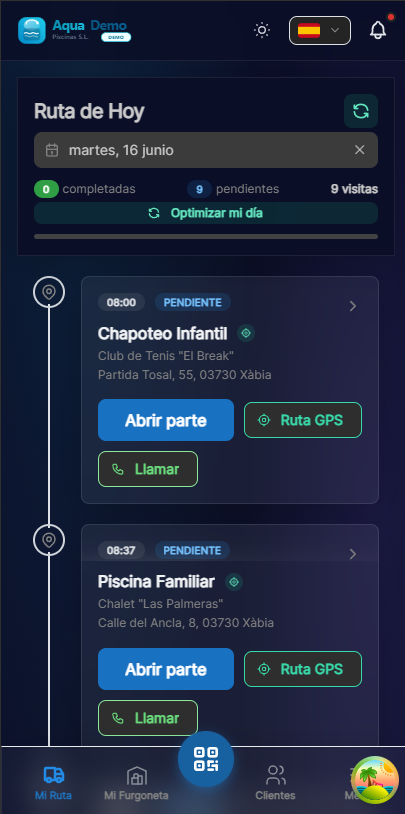
Captura con datos demo AquaDemo.Capture with AquaDemo demo data.Mobile view with demo user carlos.t@empleados.aquademo.example (AquaDemo technician).
| Icon | Name | What is it for |
|---|---|---|
| 🗺️ | My Route | See pools of the day and surf |
| 📋 | Part | Fill in work done (only in pool) |
| 📦 | My Stock | See material in van |
| ⚙️ | More | Keys, scanner, profile... |
📋 Content of this section
📁 TECHNICIAN APP
│
├── 📋 [Work Order](./work-order-wizard)
│   └── How to fill in the work order step by step
├── 📴 [Offline Mode](./offline-mode)
│   └── Work offline and sync later
├── 📦 [Stock Management](./stock-management)
│   └── Manage van stock
├── 🔔 [Alerts & Notifications](./alerts)
│   └── GPS, inactivity, reminders
└── 📱 [QR Scanner](./qr-scanner)
    └── Identify pools and create urgencies
🎓 Important concepts for technicians
How do visits arrive on the mobile phone?
- The administrator plans on the computer
- The technician opens the app
- Visits appear automatically
- You don't have to do anything, just see them
What happens if there is no internet?
The app works without internet (offline mode):
- You see the downloaded visits
- You can fill parts
- Everything is saved on your mobile
- When there is wifi, it synchronizes itself
###How does the boss know what I've done?
When you complete a part:
- You send it from the app
- Reach the server
- The administrator sees it on his computer
- It appears as "completed" on the calendar
💡 Tips for technicians
Before leaving:
- ✅ Open the app and check that you see today's visits
- ✅ Download the route (in case there are areas without coverage)
- ✅ Charge your mobile well
During the day:
- ✅ Mark each visit when finished
- ✅ If you are missing material, write it down
- ✅ If there is any incident, take a photo
When finished:
- ✅ Check that all visits are "Completed"
- ✅ If you have wifi, wait for it to sync (cloud icon)
❓ Technician FAQ
"Does the app consume a lot of data?"
No. It only syncs texts and numbers. Photos can wait for wifi.
"What if I forget my cell phone?"
You can't work without it. It is your work tool.
"Can I use the app on my tablet?"
Yes, it works on any device with internet.
"Is the boss monitoring me via GPS?"
Only when you check "Start Job". He doesn't watch you all day.
🔧 The app is the technician's tool
Without it, there is no registered work. With her, everything flows.