

📊 Stock Control
Estimated time: 10 minutes
Level: 🟢 Easy
The balance between running out of material and clogging up the warehouse
🎯 What is Stock Control?
It is the system that notifies you when and how much you need to buy of each product, maintaining stock at optimal levels.
✅ Available Features
Load Letter (Minimum/Maximum Stock)
Available: ✅ Implemented
Set stock levels for each product in each warehouse:
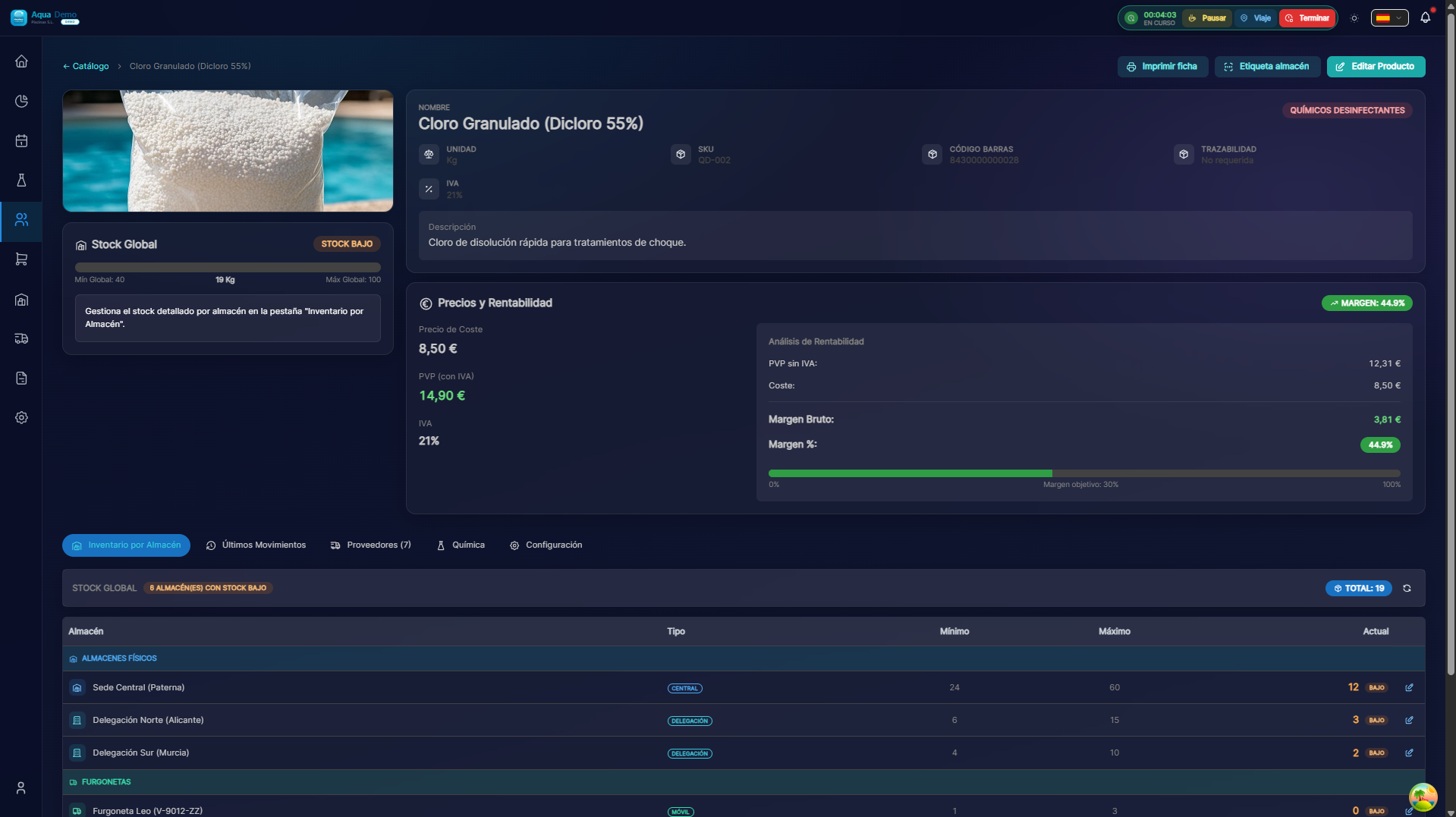
Captura con datos demo AquaDemo.Capture with AquaDemo demo data.
Procurement Engine (MRP)
Available: ✅ Implemented
Automatic system that decides the best supply strategy:
📦 MOTOR MRP - Análisis de Necesidades

Situación: Pedido de venta requiere 20 unidades de Cloro

Análisis automático:
├─ 1. ¿Hay stock en almacén principal?
│  └─ Sí: 45 unidades → Usar local ✅
│
├─ 2. Si no hay suficiente, ¿hay en otros almacenes?
│  └─ Sí: Furgoneta Juan tiene 15 → Generar transferencia 🚚
│
└─ 3. Si no hay en ningún sitio, ¿qué proveedor?
   └─ Proveedor: Químicos del Mar → Generar pedido de compra 📋

✅ Todo automático, con trazabilidad completa
Access: Warehouse → Fulfillment → Analyze Needs
📅 Features Coming Soon
Automatic Low Stock Alerts
Available: 📅 Coming soon - Q3 2026
The system will automatically notify you when:
┌─────────────────────────────────────────────┐
│  🔔 ALERTAS DE STOCK                       │
├─────────────────────────────────────────────┤
│                                             │
│  ⚠️ STOCK BAJO (3 productos)               │
│                                             │
│  • Cloro Granulado                         │
│    Almacén Central: 8 unidades             │
│    Mínimo configurado: 10                  │
│    [📋 Crear pedido]                       │
│                                             │
│  • pH- Líquido                             │
│    Furgoneta Juan: 2 litros                │
│    Mínimo configurado: 5                   │
│    [🔄 Solicitar recarga]                  │
│                                             │
└─────────────────────────────────────────────┘
Notification channels:
- [ ] Email to the purchasing manager
- [ ] Push in the app
- [ ] Dashboard with traffic lights 🟢🟡🔴
Automatic Order Point
Available: 📅 Coming soon - Q3 2026
Smart calculation of when to buy:
🔍 Check Stock
By Product:
By Warehouse:
Complete list of products in a specific warehouse with filters for low stock.
🛠️ Stock Settings
Available: ✅ Implemented
When you find differences between system and reality:
Note: The settings are recorded in the history with username and date.
🚐 Stock in Vans
Specific control for moving stock:
💡 Practical Tips
Calculate minimums:
Fórmula básica:
Mínimo = (Consumo diario × Días de reposición) + Seguridad

Ejemplo Cloro:
- Consumo: 2 sacos/día
- Reposición: 7 días
- Seguridad: 5 sacos
- Mínimo = (2 × 7) + 5 = 19 sacos
Calculate maximums:
Máximo = Mínimo + (Consumo diario × Días entre pedidos)

Ejemplo:
- Si pides cada 2 semanas (14 días)
- Máximo = 19 + (2 × 14) = 47 sacos
❓ Frequently Asked Questions
"Does the system automatically notify you when there is a lack of stock?"
Not currently. You can see the status in the dashboard, but automatic email/push alerts are in development for Q3 2026.
"How do I know how much to ask?"
The MRP (Fulfillment) engine suggests quantities based on pending sales orders and available stock.
"Can I have negative stock?"
It is configurable. By default no, but you can activate it in Settings → Company → Allow negative stock.
"Does the technician see his stock in the app?"
Yes, in the "Stock" tab they see what they have in their van and can request a refill.
✅ Configuration Checklist
- [ ] Check current stock of all products
- [ ] Configure minimums based on actual consumption
- [ ] Configure maximums according to warehouse capacity
- [ ] Define default supplier for each product
- [ ] Check van stock weekly