

📄 Client File - Advanced Configuration
Access
Open a client from the list (click on the row or quick view). Billing tab (permission CLIENT_VIEW_FINANCIAL_DATA / edit CLIENT_EDIT_FINANCIAL).
Estimated time: 15 minutes of reading
Level: 🟡 Medium - Requires attention
Importance: ⭐⭐⭐ CRITICAL - If you configure this wrong, invoices come out wrong
🎯 What are you going to learn?
This guide explains advanced settings for a client:
- ✅ The 3 payment methods (with real examples)
- ✅ How to choose the right mode
- ✅ Special discounts per client
- ✅ Useful notes and settings
⚠️ IMPORTANT
What you configure here directly affects how invoices are generated. Read it carefully.
🏗️ Where is this setting?
- Operation → Clients and Pools.
- Press the customer name (you enter the complete file).
- Billing tab — payment mode cards and monthly fee.
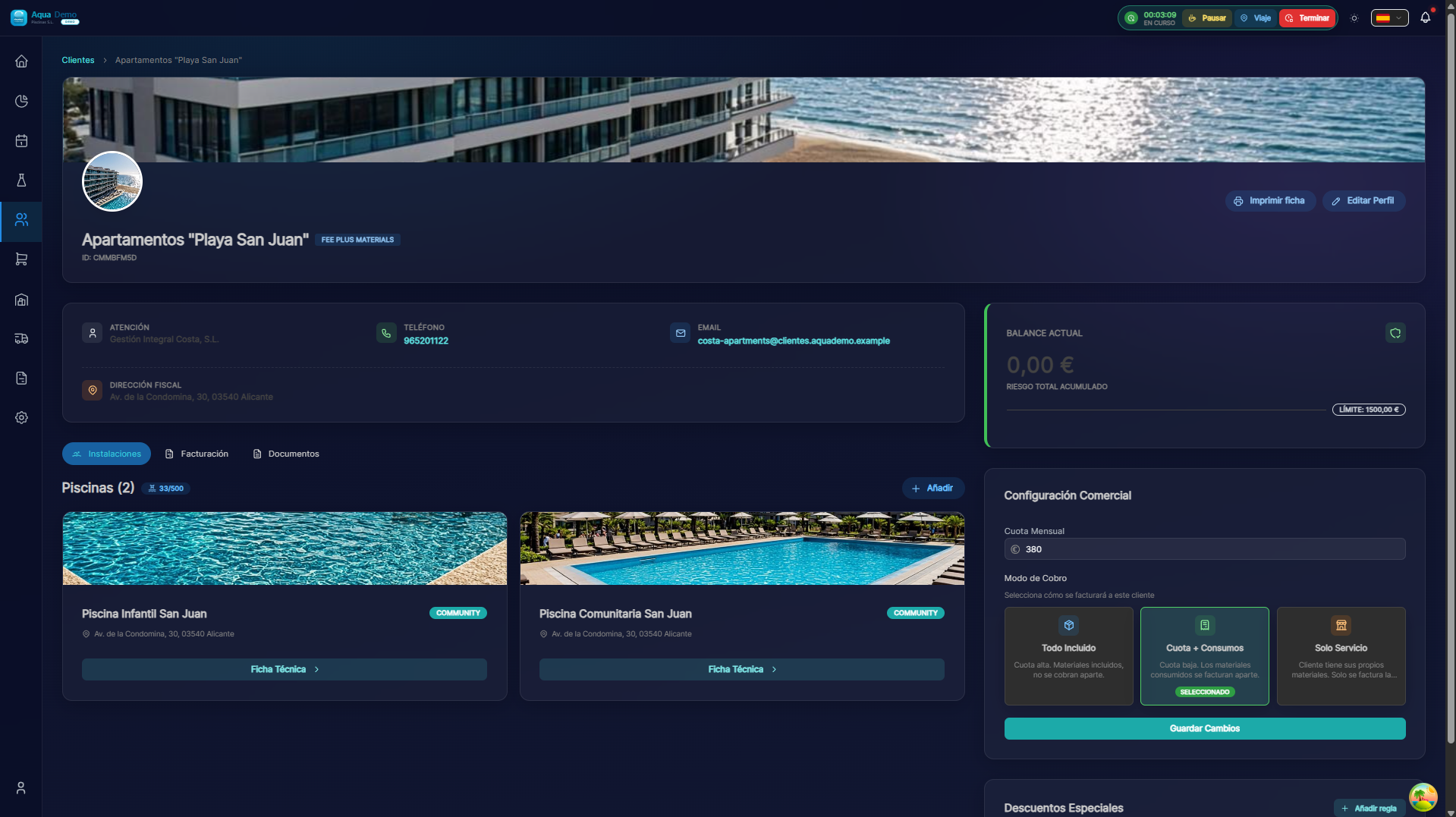
Captura con datos demo AquaDemo.Capture with AquaDemo demo data.
📦 MODE 1: All Inclusive
How does it work?
The client pays a fixed monthly fee and that includes:
- ✅ Cleaning work
- ✅ All the chemicals you use
- ✅ There are no surprises on the bill
When to use it?
Use this mode when:
- The client wants predictability (always pay the same)
- You don't want to worry about consumption
- You have pools with stable consumption and you can calculate the price well
Real example:
Hotel La Palmera
- Pay: €150/month
- You make: 3 weekly visits
- You use: Whatever is needed (chlorine, pH, algaecide...)
- Invoice: Always €150, it doesn't matter if you spend €20 or €40 on products
How to configure it?
In the client file:
- Collection Mode: "All Inclusive"
- Monthly Fee: €150
- Periodicity: Monthly
Advantages and disadvantages:
| ✅ Advantages | ❌ Disadvantages |
|---|---|
| Client knows what he pays | If you spend a lot on products, you lose money |
| Invoices always the same | If you spend little, you could have charged more |
| Easier to sell | You need to calculate the price well |
💡 How to calculate the price
Look at the historical consumption of products from that pool. If you usually spend €30/month on products and want to charge €50 for the work:
Fee = €30 (products) + €50 (work) + safety margin (€10) = €90/month
📊 MODE 2: Quota + Consumption
How does it work?
The client pays:
- A small fee for cleaning work
- Separately pay for the products you actually consume
When to use it?
Use this mode when:
- The client wants to pay only what they spend
- There is a lot of variation in consumption between visits (e.g. summer vs winter)
- The client is a retailer and wants to see a breakdown
Real example:
El Sol Neighborhood Community
- Pay fee: €50/month (for the work to come)
- Additionally pays:
- January: €15 (winter products)
- July: €85 (a lot of chlorine in summer)
- January invoice: €50 + €15 = €65
- July invoice: €50 + €85 = €135
How to configure it?
In the client file:
- Collection Mode: "Fee + Consumption"
- Monthly Fee: €50
- Product Prices: (they are configured separately, see Catálogo de Productos)
Advantages and disadvantages:
| ✅ Advantages | ❌ Disadvantages |
|---|---|
| Fair for both parties | Variable invoices (customer does not know how much they will pay) |
| You don't lose money in summer | More complex to explain |
| Customer sees exactly what they consume | Requires strict consumption control |
🔧 MODE 3: Service Only
How does it work?
The client pays only for the work. The products:
- ❌ You don't buy them
- ❌ You don't manage them
- ✅ The customer buys them and has them available
When to use it?
Use this mode when:
- The client wants to control the products
- It is a large community with its own warehouse
- It is a hotel with its own chemical supplier
Real example:
Olympic Sports Club
- Pay: €100/month (just for coming to clean)
- Products: The club buys them directly from a supplier
- You use: Whatever is in your warehouse
- Invoice: Always €100
How to configure it?
In the client file:
- Charging Mode: "Service Only"
- Monthly Fee: €100
- There are no products on the invoice
Advantages and disadvantages:
| ✅ Advantages | ❌ Disadvantages |
|---|---|
| You do not invest in product stock | If the customer runs out of products, you cannot work well |
| Simpler invoices | Less control over water quality |
| Ideal for large clients | They may ask you to use poor quality products |
🎯 Which mode do I choose? - Decision guide
¿El cliente quiere pagar siempre lo mismo?
├── SÍ → ¿Sabes cuánto gastará en productos?
│        ├── SÍ → ✅ MODO 1: Todo Incluido
│        └── NO → ⚠️ Estudia el consumo primero
│
└── NO → ¿El cliente quiere ver desglose de productos?
         ├── SÍ → ✅ MODO 2: Cuota + Consumos
         └── NO → ¿El cliente compra sus propios productos?
                  ├── SÍ → ✅ MODO 3: Solo Servicio
                  └── NO → ✅ MODO 2: Cuota + Consumos (recomendado)
💸 Special Discounts
In addition to the payment method, you can apply custom discounts to each customer.
Discount types:
1. Global percentage discount
Example: "We give this customer a 10% discount on everything"
What is it for:
- Old customers who have a special price
- Promotions
- Trade agreements
How to configure it:
- In the client file → "Billing" tab
- Global Discount: 10%
2. Discount by product category
Example: "20% discount on chlorine, but not on the rest"
What is it for:
- Customers who buy a lot of a specific product
- Specific promotions
3. Special price per product
Example: "Chlorine costs this client €2/kg, others €2.50/kg"
What is it for:
- VIP Clients
- Contracts with volume
⚠️ Be careful with discounts
If you put too many discounts, the bill can be very low. Always check before broadcasting.
📝 Notes and Observations
In the "Notes" tab you can write useful information:
Examples of useful notes:
About access:
"The key is with the doorman. Ring the bell before entering."
About preferences:
"The manager doesn't like us coming in before 10:00."
About work:
"Use little chlorine, the owner is allergic to the strong smell."
About payments:
"Always delay payment for 15 days, don't worry."
About incidents:
"Old purifier, make sure it doesn't get clogged."
💡 These notes are seen by all technicians
When a technician goes to do the work report, he can see these notes. Use them to communicate important things!
📊 Visual Configuration Summary
CLIENT FILE - BILLING TAB

┌─────────────────────────────────────────────┐
│ MODO DE COBRO                               │
│ ○ Todo Incluido                             │
│ ● Cuota + Consumos      ← SELECCIONADO      │
│ ○ Solo Servicio                             │
├─────────────────────────────────────────────┤
│ CUOTA MENSUAL                               │
│ [ 50 ] €/mes                                │
├─────────────────────────────────────────────┤
│ DESCUENTOS                                  │
│ Global: [ 0 ] %                             │
│                                             │
│ Por categoría:                              │
│ - Químicos: [ 10 ] %                        │
│ - Accesorios: [ 0 ] %                       │
├─────────────────────────────────────────────┤
│ NOTAS INTERNAS                              │
│ [El cliente paga siempre el día 15         │
│  por transferencia]                         │
└─────────────────────────────────────────────┘
❓ Frequently asked questions
"Can I change the payment method later?"
Yes, but be careful. If you change from "All Inclusive" to "Fee + Consumption", the next bill will be different. Notify the client.
"What happens if I put 'All Inclusive' mode but the technician notes consumption?"
No problem. Consumption is recorded for your information, but is not billed. They help you know if you are making or losing money.
"Can I have different modes for different pools of the same client?"
No. The payment method is per client, not per pool. All pools of the same client are billed together.
"Does the customer see these discounts?"
Yes, the applied discounts appear on the invoice.
✅ Configuration Checklist
Before completing a client configuration:
- [ ] I have chosen the correct payment method
- [ ] I have set the appropriate monthly fee
- [ ] If applicable, I have configured discounts
- [ ] I have written useful notes for technicians
- [ ] I have saved the changes
- [ ] I have understood how invoices will be generated
⚠️ Remember
The charging mode is the most important client setting.
If you get it wrong, the invoices will go wrong.