

👋 Welcome to PoolControl Pro
Estimated time: 5 minutes of reading
Level: 🟢 Easy - Anyone can do it
🎯 What are you going to learn here?
On this page we are going to explain:
- What exactly is PoolControl (no weird words)
- How the program is organized
- Where to start so as not to get lost
- What you can do and what you can't (yet)
💡 Advice
Don't try to learn everything at once. Read this page, then go to Quick Guide and do the steps one by one. Rome was not built in a day.
🤔 What is PoolControl Pro?
The short version (30 seconds)
PoolControl is like having a digital assistant for your pool cleaning company. It is responsible for:
- Remind you which pools need to be cleaned each day
- Tell your workers where they have to go
- Write down what products they use
- Make invoices automatically
- Tell you if you win or lose money
The long version (for the curious)
Imagine that you manage a pool maintenance company. You have:
- 🏊 50 pools to clean
- 👷 3 workers who clean them
- 🚗 3 vans with chemicals
- 📞 50 clients that need to be invoiced
Without PoolControl: You manage it with paper, WhatsApp, Excel and a lot of patience. You're probably forgetting something.
With PoolControl: Everything is in one place. You open the program and see:
- A map with all the pools
- A calendar with who goes to each place
- How much material do you have left in each van
- How much money do clients owe you?
And the best: your workers see it on their mobile. They arrive at the pool, record the pH of the water, mark the tasks completed, and you see everything on your computer instantly.
🏗️ How is PoolControl organized?
Think of PoolControl as a virtual office with multiple rooms. Each room is for one thing:
Room 1: Clients and Pools 👥
What it is for: Here you save the information of your clients and their pools.
What you can do:
- See list of all your clients
- Add a new client (e.g. "Hotel La Palmera")
- Add your pools (ex: "Main pool", "Children's pool")
- Put where each pool is (GPS)
- Configure which chemicals are used in each one
Real example:
"Hotel La Palmera has 2 swimming pools. In the large one I use a lot of chlorine because it has a lot of bathers. In the small one I use less. PoolControl reminds me of this every time my technician goes there."
Where it is in the program: Operational tab → Clients and Pools (or Management menu depending on layout)
Room 2: Planning 📅
What it is for: Organize who goes to which pool and when.
What you can do:
- See a calendar with all visits
- Assign a technician to each pool
- Change day visits if it rains
- See which technician has the most work
Real example:
"On Mondays, Wednesdays and Fridays Juan goes to the Hotel La Palmera. If Juan gets sick, I drag the visit to Tuesday and assign it to Pedro. All by dragging with the mouse."
Where it is in the program: Operational → Agenda (Drag & Drop) and Master Routes
Room 3: Technician App 🔧
What it is for: What your workers see on their mobile.
What technicians can do:
- View your route for the day (Pool A → Pool B → Pool C)
- Navigate with GPS to the pool
- Record the pH, chlorine and temperature of the water
- Mark what they have cleaned (skimmer, pool cleaner...)
- Say what products they have spent
- Take photos if there is any problem
- Order more material if you run out
Real example:
"My technician arrives at the pool, opens the app, measures the pH (it's at 7.2), writes it down, cleans the skimmer, marks that he's done it, and can move on to the next one. I see everything on my computer in real time."
Where it is: On the technician's cell phone. You don't go in here directly, but you configure what they see.
Room 4: Sales and POS 💰
What it is for: Sell products (chlorine, pills, etc.) to customers who pass by your store.
What you can do:
- Open the "cash register" in the morning
- Search products and add them to sale
- Collect in cash or card
- Give a delivery note (ticket) to the client
- See how much you have sold today
Real example:
"A customer comes in and wants 5 kilos of chlorine. I look for it in the program, I add it to the sale, I charge €25, and the program tells me that I have 45 kilos left in the warehouse."
Where it is in the program: Business → New Quick Sale (POS) and Cases / Shifts (requires billing module)
Room 5: Shopping 📦What it is for: Buy products from your suppliers.
What you can do:
- See what suppliers you have (e.g. "Químicos del Mar S.L.")
- Place product orders
- Record when the merchandise arrives
- Write down when you have to pay them
Real example:
"I only have 10 kilos of chlorine left. The program notifies me. I place an order for 200 kilos from Químicos del Mar. When it arrives, I confirm it and the stock updates itself."
Where it is in the program: Business or Logistics → Purchasing / orders from supplier (plan with stock Pro)
Room 6: Inventory 🏭
What it is for: Know what you have and where you have it.
What you can do:
- See stock in your main warehouse
- See what each van carries
- Move products from one place to another
- See what's over
Real example:
"I have 500kg of chlorine in the central warehouse. Juan (Technician 1) has 50kg in his van. Pedro (Technician 2) has 30kg. The program tells me that Pedro is running out of chlorine and I assign him more from the warehouse."
Where it is in the program: Logistics → transfers, infrastructure, physical inventory
Room 7: Billing 🧾
What it is for: Charge your clients.
What you can do:
- Generate automatic maintenance invoices
- Make invoices for products sold
- See who owes you money
- Send invoices by email
- Make bank remittances (let the bank charge for you)
Real example:> "At the end of the month, I press a button and the program generates 50 invoices: one for each client with what they have to pay. Some pay a fixed fee, others pay for what they spent. The program calculates it on its own."
Where it is in the program: Finance → billing, collections, mass generation
Room 8: Reports 📊
What it is for: See how your business is doing.
What you can do:
- See how much you have spent on products this month
- See how many hours each technician worked
- See which pools consume the most products
- Compare months (am I doing better than last year?)
Real example:
"I see that I spend a lot on chlorine at the Hotel La Palmera. I talk to the client and I raise his fee a little. I also see that Pedro works faster than Juan, so I assign him more pools."
Where it is in the program: Finance / Strategy (Manager) → delinquency reports, treasury, profitability...
Room 9: Settings ⚙️
What it is for: Configure how the program works.
What you can do:
- Register new workers
- List what each one can do (can Juan see the invoices? Or just his pools?)
- Set up your company (name, CIF, address...)
- See who has done what in the program (audit)
Real example:
"I hire a new technician, Luis. I sign him up, I tell him that his color on the calendar is green, and that he can only see his own pools, not those of others."Where it is in the program: System tab → Team, Company, Roles, My Plan
🗺️ PoolControl visual map
The app is organized into tabs (top) and side menu (left). These screenshots show the main areas with real data from the demo:
| Area | Capture |
|---|---|
| Home (dashboard) | 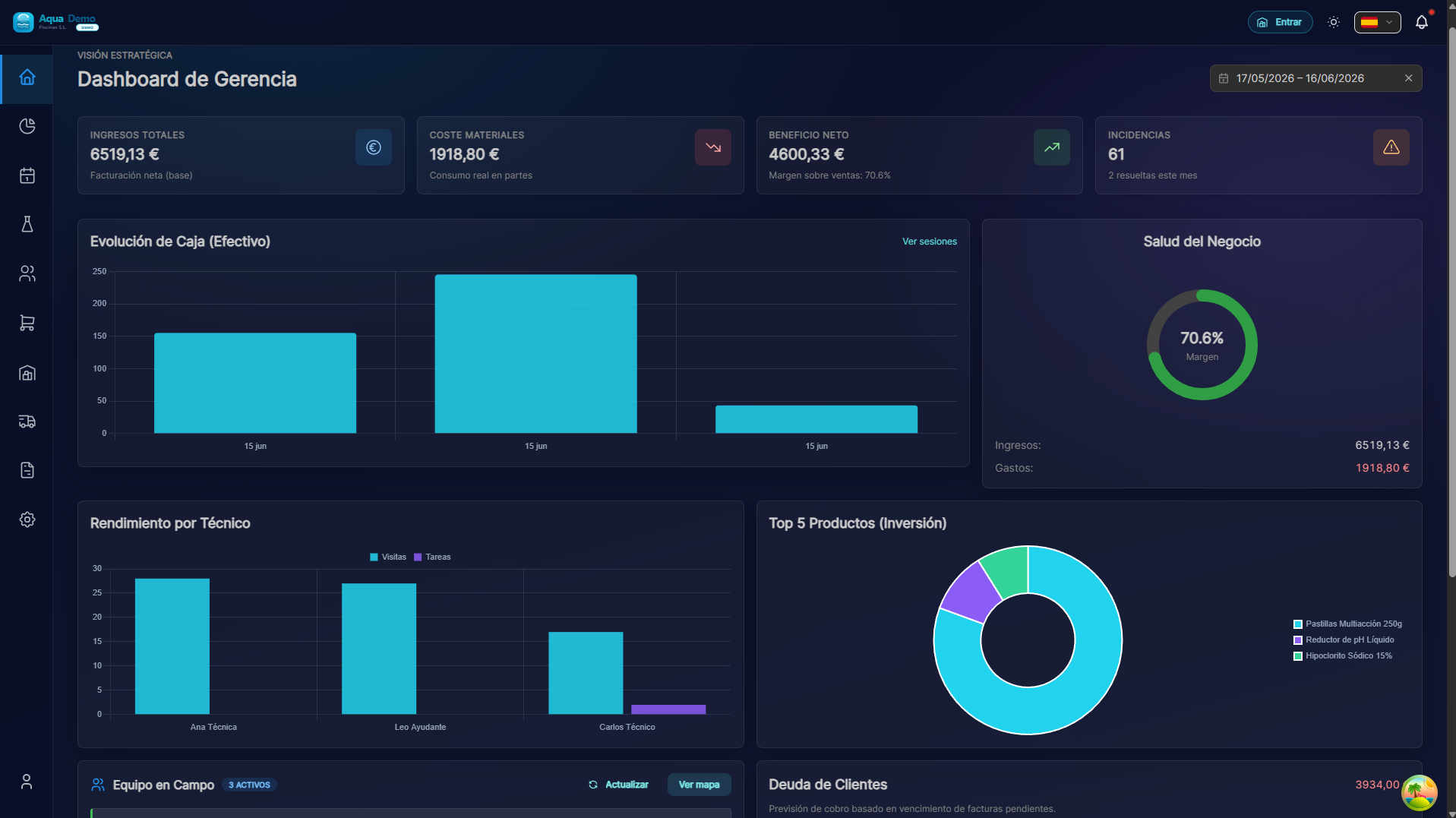 |
| Operational (clients, agenda...) | 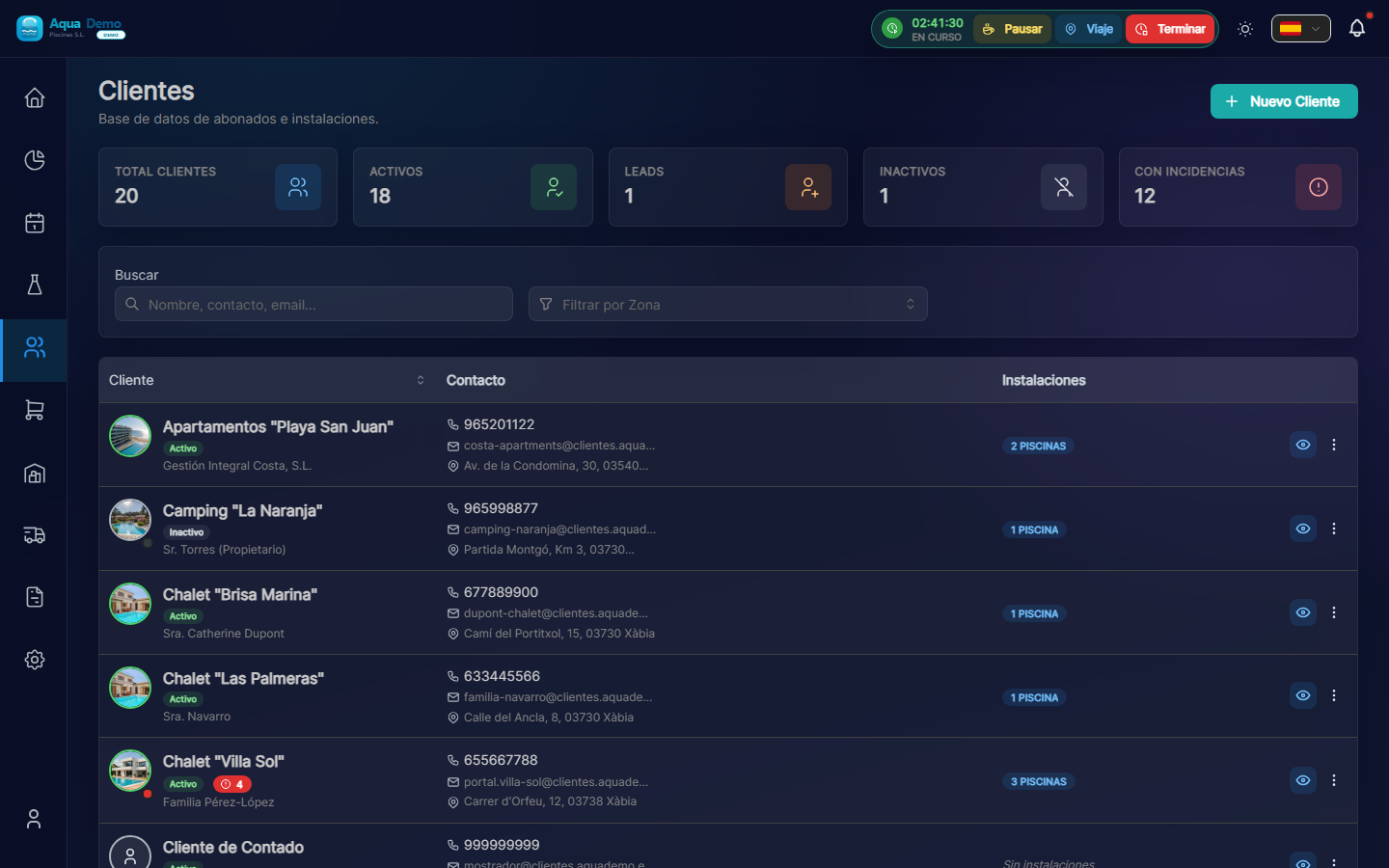 |
| Business (catalogue, sales...) | 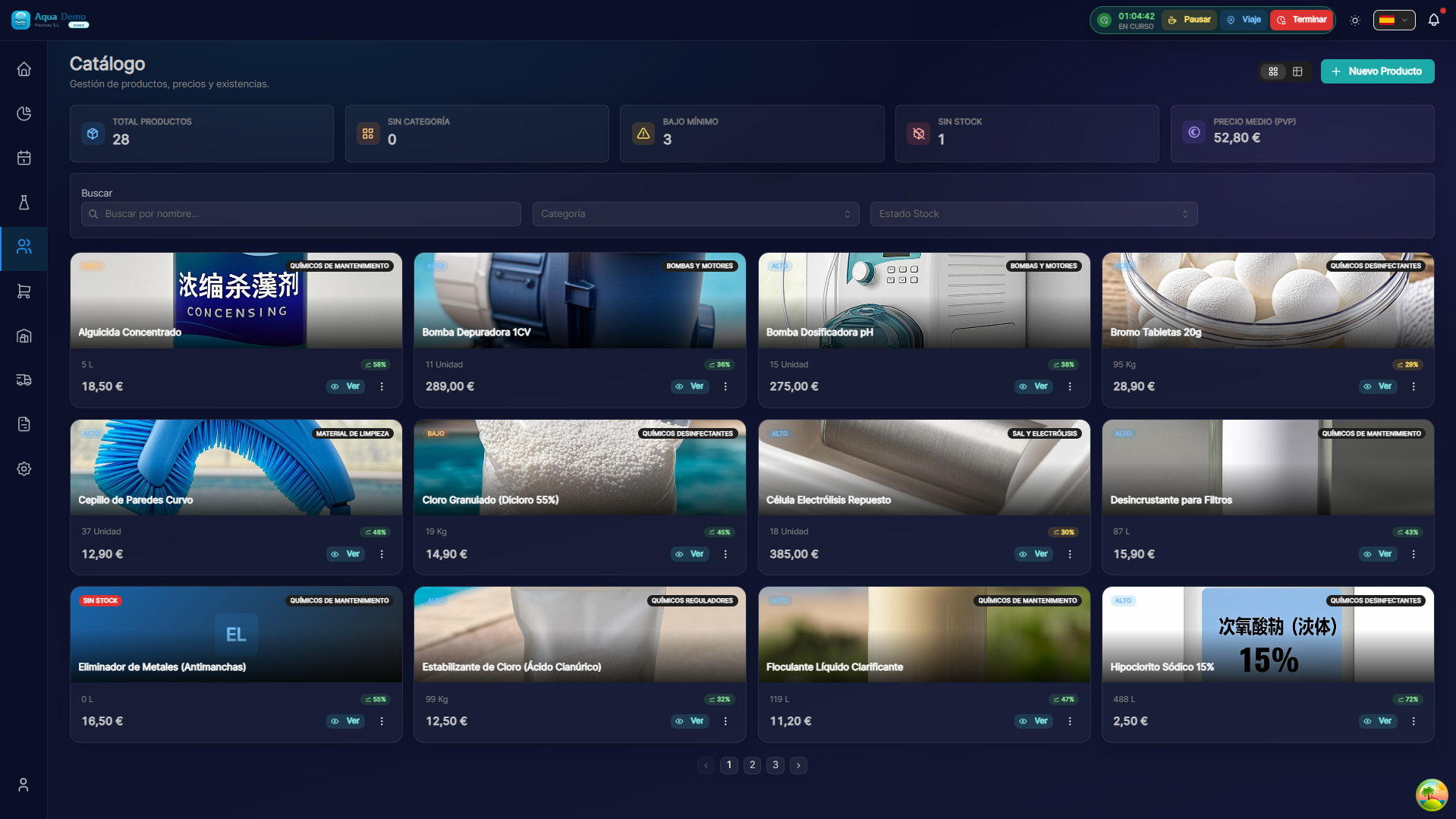 |
| Logistics (transfers…) | 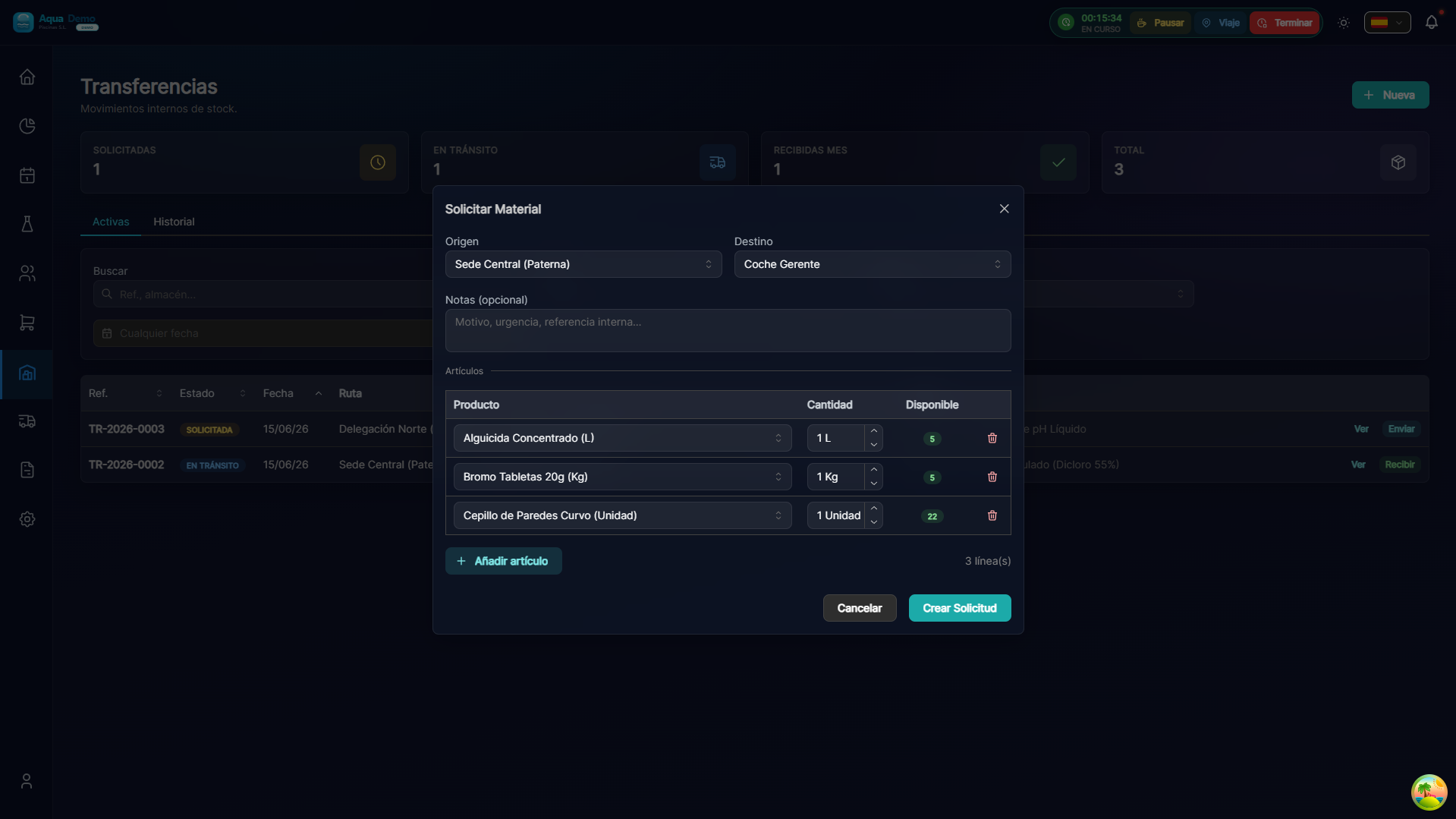 |
| Finances (portfolio, billing...) | 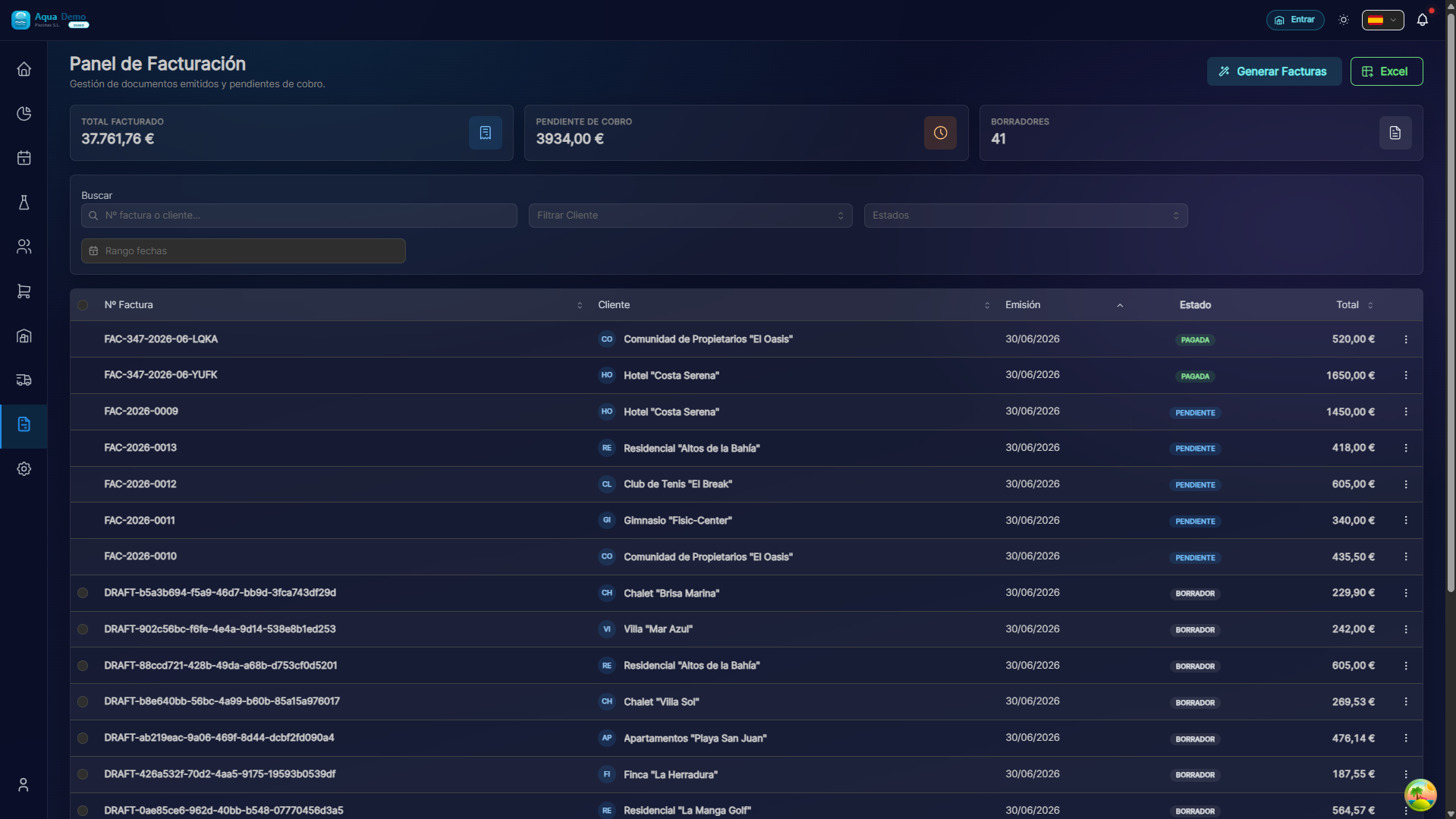 |
| System (team, roles...) | 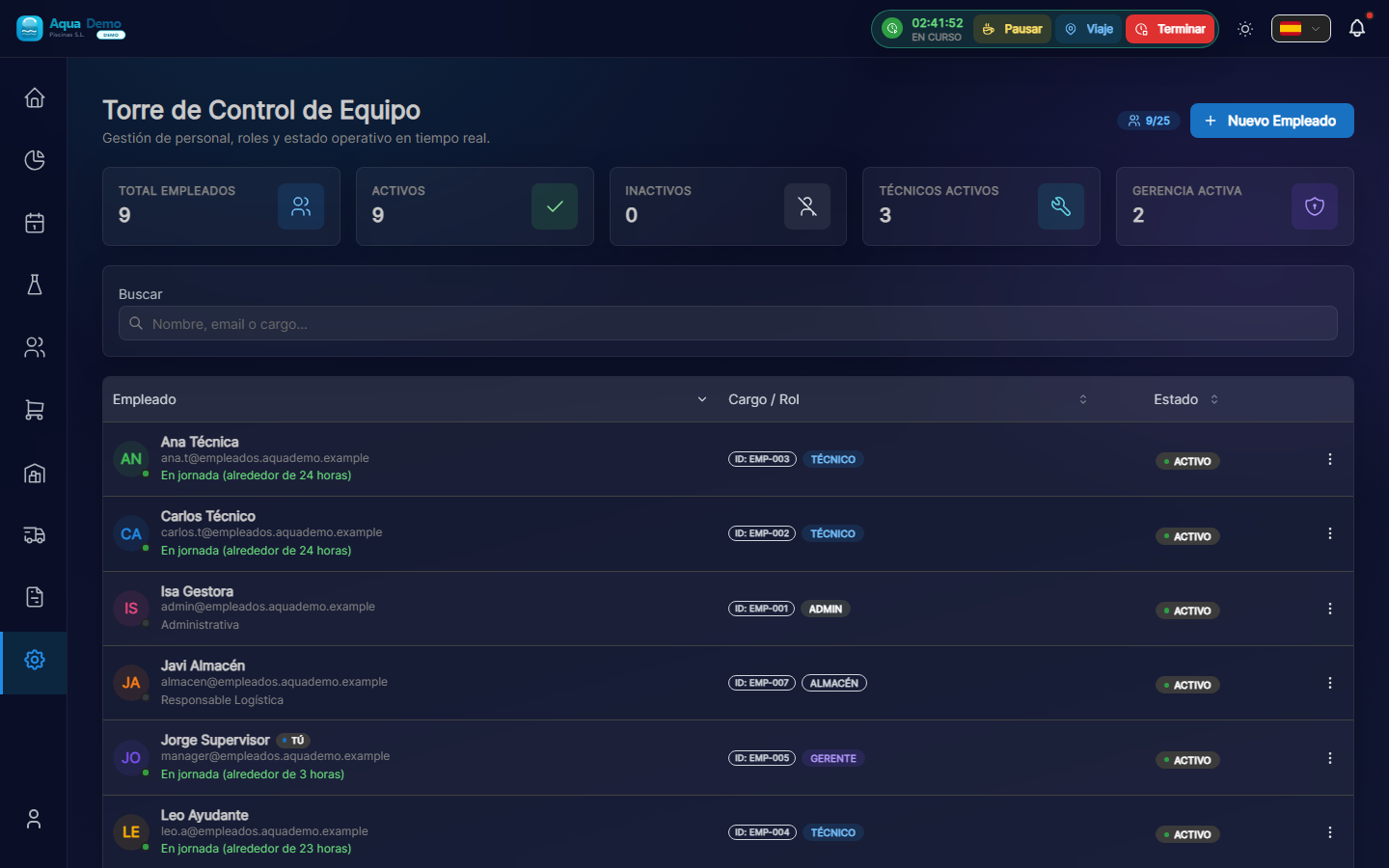 |
Examples of screens: planning agenda, purchase orders and budgets:
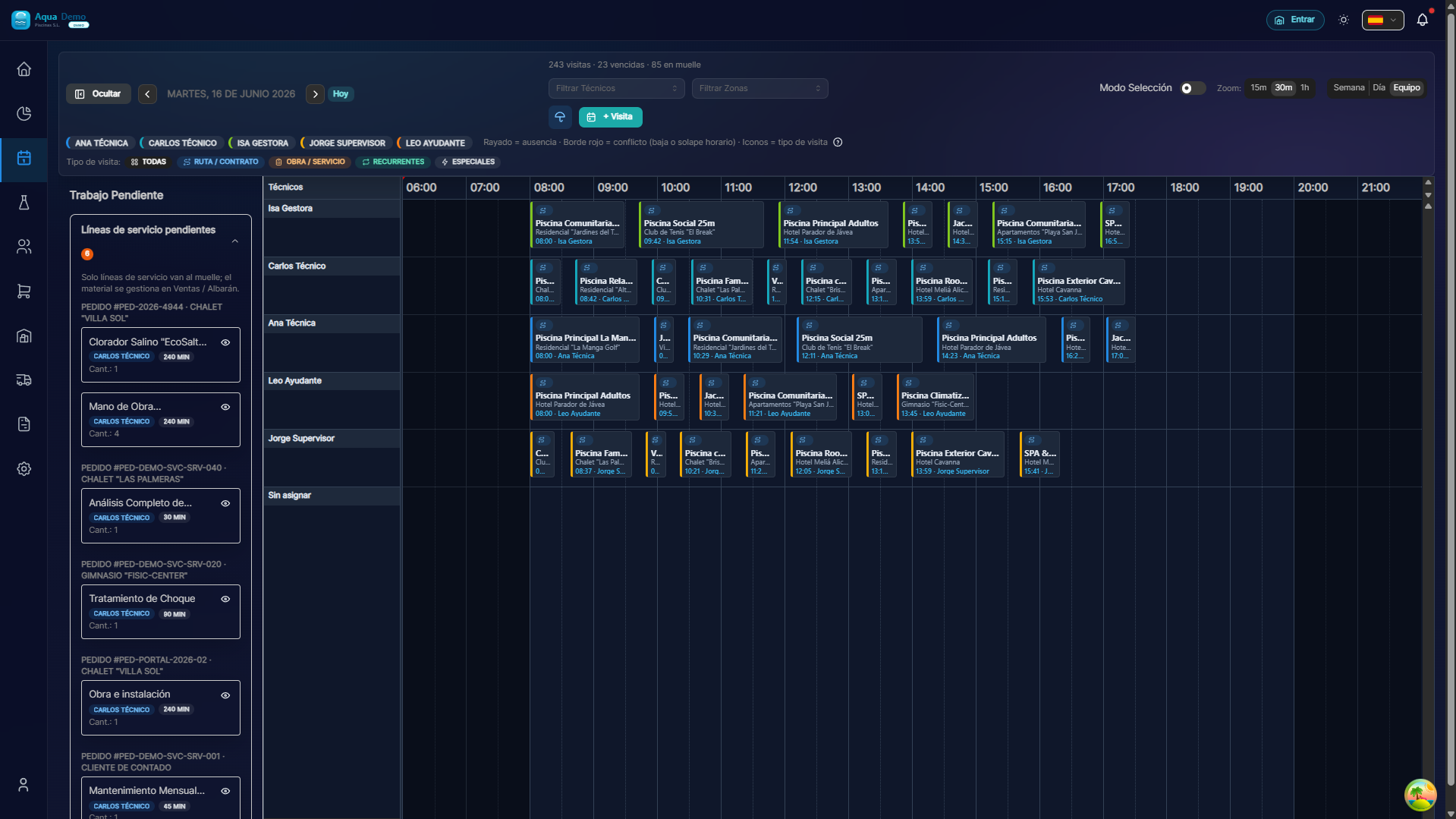
Captura con datos demo AquaDemo.Capture with AquaDemo demo data.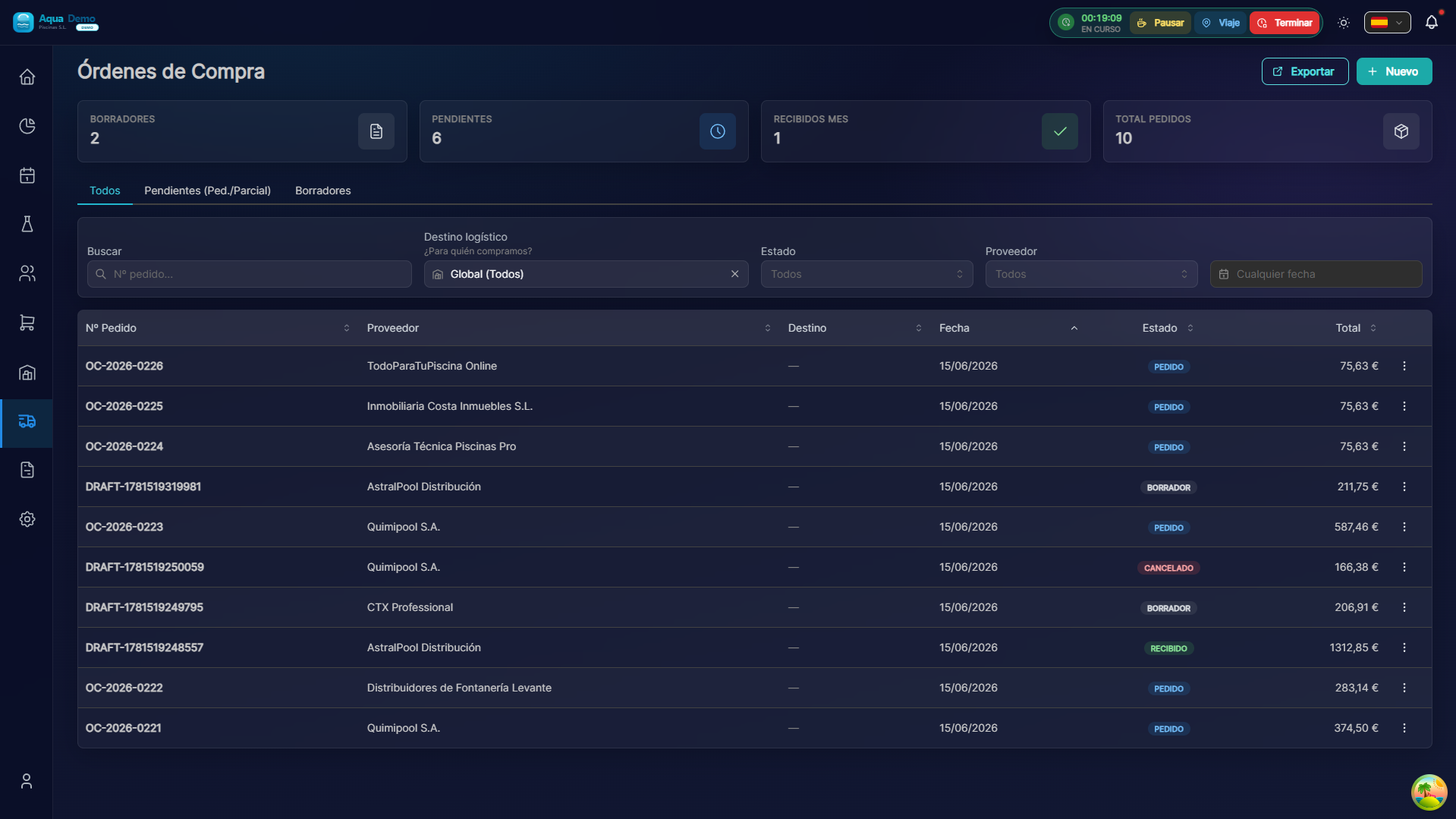
Captura con datos demo AquaDemo.Capture with AquaDemo demo data.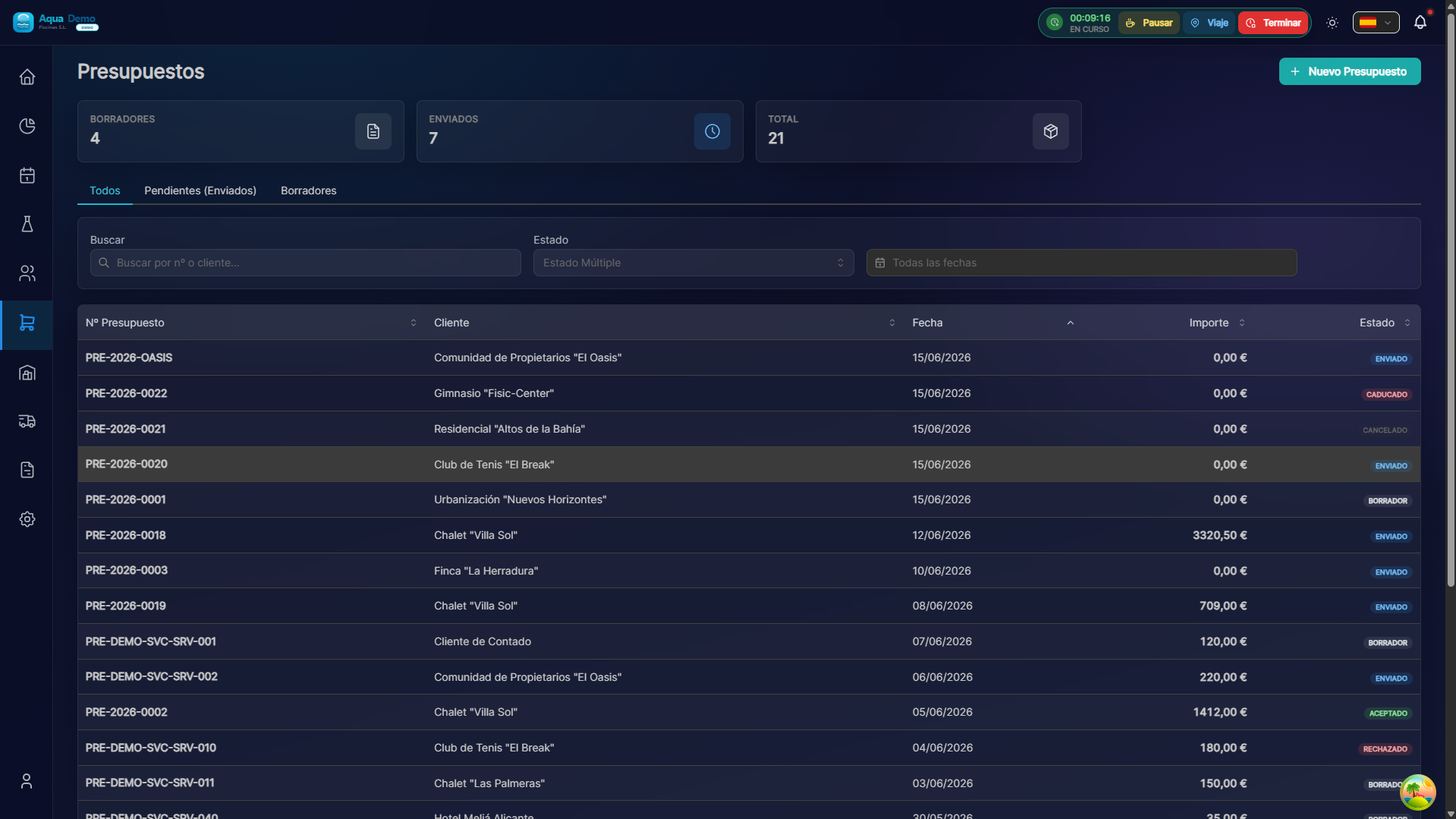
Captura con datos demo AquaDemo.Capture with AquaDemo demo data.
🎓 Concepts you MUST understand before starting
There are 4 important ideas. If you understand them, everything else will be easy:
1️⃣ Client vs Pool
- Client = The person or company that pays (e.g. Hotel La Palmera S.L.)
- Pool = The physical location where the work is done (e.g. "Hotel Main Pool")
Why is it important?
A client can have several pools. Hotel La Palmera has 2 swimming pools. I bill the customer ONE time, but my technicians do the work on TWO different pools.
2️⃣ Visit vs Route
- Visit = Once a technician goes to a pool (ex: "Juan goes to the Hotel La Palmera on Monday the 15th")
- Route = All the visits that a technician makes in a day (e.g.: "Juan: Hotel La Palmera → Casa García → Comunidad El Sol")
Why is it important?
A route is a set of visits. If you cancel a route, you cancel all visits for that day.
3️⃣ Stock Central vs Stock Van
- Stock Central = What you have in your large warehouse
- Van Stock = What each technician carries in his car
Why is it important?
The technician consumes from his van, not from the central warehouse. If you don't transfer products from the warehouse to the van, it is left with nothing.
4️⃣ Collection Modes
There are 3 ways to charge a customer. You MUST understand this well:
| Mode | How it works | Example | |------|-----|---------|| All Inclusive | The client pays a fixed monthly fee and that's it. The products are included. | "€150/month and I don't worry about anything else" | | Fee + Consumption | Pay a small fee + separately pay what you spend. | "€50/month + whatever you spend on chlorine" | | Service Only | You only pay for the work. The products are yours, not mine. | "You pay me to come, you buy the chlorine" |
Why is it important?
If you configure this incorrectly, you may be giving away products or undercharging. Read the complete guide in Charging Modes.
✅ Checklist: Are you ready to start?
Before following the Quick Guide, make sure you have:
- [ ] Active account and access to poolcontrolpro.com/login
- [ ] Computer with internet
- [ ] A mouse (yes, seriously, with your finger on the phone it is difficult to configure)
- [ ] 30 minutes free without interruptions
- [ ] A notebook to write down doubts
⚠️ Important
If you are using your mobile to read this, we recommend switching to your computer. Setting up the program from your mobile is like trying to write a book on a postcard: you can, but it's uncomfortable.
🚀 Where do I go next?
You have 3 options:
Option A: I want to start now (Recommended)
👉 Go to **Quick Guide
** and follow the steps one by one. In 15 minutes you will have your first client and your first pool registered.
Option B: I want to understand everything before touching anything
👉 Read **Configuration Checklist
**. It is a list of EVERYTHING you have to do to have the program 100% ready.
Option C: I already use PoolControl but I have a specific question
👉 Use the search bar above (the magnifying glass 🔍) and write your question. For example: "how do I change a pool technician."
PoolControl is a tool, not an end in itself. It's okay if you don't understand something the first time. Take your time, read again, and if you're still stuck, write to us.
📞 Do you need personalized help?
- 📧 Email: info@poolcontrolpro.com
- 💬 Chat: "Help" button within the app
Hours: Monday to Friday, 9:00 - 18:00