

🧭 How to Navigate PoolControl
Do you feel lost? The menu changes depending on your role and according to the contracted plan. This guide describes the app as it is in production (June 2026).
🌐 How to enter
- Open the browser (Chrome recommended).
- Go to **https://poolcontrolpro.com/login
**. 3. Enter email and password. 4. You will enter the ERP: /app/pool-control (dashboard).
Help Center
You are reading the help at https://poolcontrolpro.com/help/ — it is the same domain as the app, folder /help/.
🖥️ Screen structure (desktop)
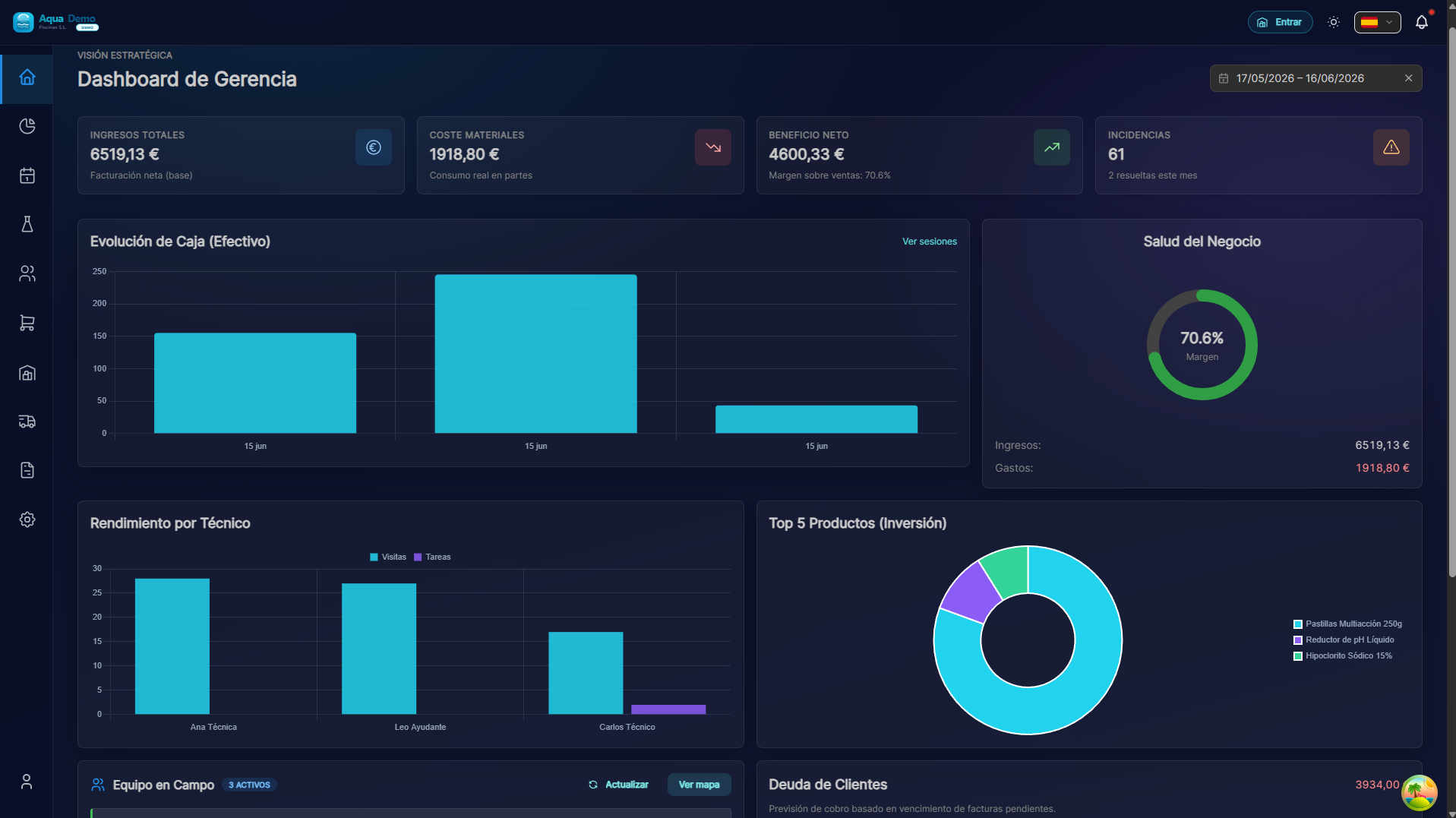
Captura con datos demo AquaDemo.Capture with AquaDemo demo data.Real capture (demo user manager@empleados.aquademo.example, AquaDemo Piscinas S.L. company with example data).
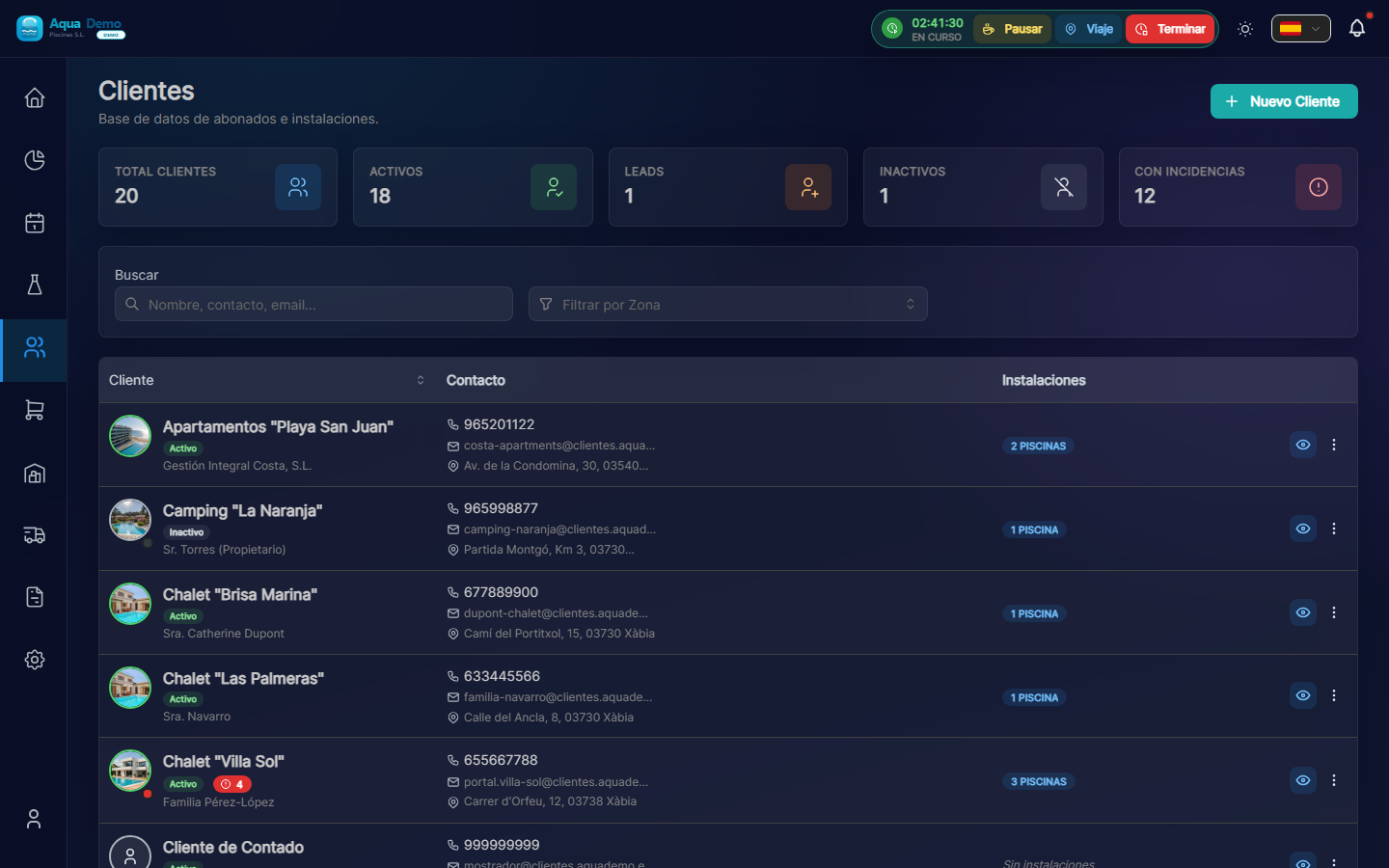
Captura con datos demo AquaDemo.Capture with AquaDemo demo data.
- Logo → return to the dashboard (
/app/pool-control). - Upper tabs (Home, Operational, Business...) → change the side menu.
- Side menu → specific links (clients, agenda, invoices...).
- Profile (👤) → log out, Help Center, role change if applicable.
Not everyone sees the same tabs
A Technician does not see office “Operations”: he sees Field Work (My Route, My Van, My Keys, Scan QR). An Accountant sees primarily Finances.
📑 Tabs and menu (Admin / Manager — usual layout)
After logging in as an administrator or manager, the tabs above organize the menu:
Home
| Link | Route |
|---|---|
| Main Dashboard | /app/pool-control |
Operational
| Link | What is it for |
|---|---|
| Agenda (Drag & Drop) | Visit calendar (/planner) |
| Master Routes | Repeat visits (/planning/routes) |
| Geographic Zones | Group pools by area |
| Coord. Earrings | Approve GPS proposed by technicians |
| Absences | Vacation/leaves |
| Reassign Visits | Move visits between technicians |
| Incidents | Failure history (/incidents-history) |
| Clients and Pools | Registration and client file |
| Keys | Key custody (office) (/keys) |
Business
| Link | Notes |
|---|---|
| Catalog Products / Services | If your plan includes stock / billing |
| Budgets, Orders | Business role also uses them |
| Commercial Activity | Sales summary |
| New Quick Sale (POS) | Open the floating checkout panel (not a separate page) |
| Cases / Shifts | Cash Sessions |
| Signing Station | Warehouse tablet for delivery note signatures (/signing-station) |
| B2B Purchasing | Supplier orders (advanced plan) |
Logistics
Transfers between warehouses, merchandise receipts, RMA, quarantine, physical inventory, infrastructure (warehouses).
Finance
Customer billing, mass generation, collections, bills portfolio, SEPA remittances, expenses, liquidity and tax reports (depending on permits).
Reports
| Link | Route |
|---|---|
| Time tracking | /reports/time-history (TIME_TRACKING module) |
| Consumption, productivity, control tower | Per permissions and plan |
System
Team, cash registers (config), company, my plan, roles, audit.
👷 Technician Menu
| Link | Route |
|---|---|
| Dashboard | Home |
| My Route | Visits of the day |
| My Van | Stock in your mobile warehouse |
| My Keys | Assigned keys |
| Scan QR | Open part by pool QR |
| My timesheet | Sign monthly hours closure (/my-timesheet) |
Part of work: from My Route → start visit, or route /visits/{id}.
On mobile, there is usually a lower bar: My Route, My Van, Menu (rest of options).
🔵 Commercial · 🟠 Warehouse · 🟤 Accountant · ⚪ Read only
Each role has a reduced menu according to their work:
- Commercial: Clients, Budgets, Orders, Activity.
- Warehouse: Warehouses, Products, Transfers, RMA, Purchases.
- Accountant: Billing panel, generate invoices, collections, expenses, suppliers, reports.
- Read only: Consultation of clients, products, billing and reports unedited.
Permissions detail: Tipos de usuario.
🦎 Change roles without logging out (chameleon mode)
If your user has multiple roles (for example Admin + Technician):
- Tap your name / avatar (top right).
- Choose the view: Admin, Manager, Technician, etc.
- Menu updates instantly.
Useful if you are the owner and you also do routes in the field: you configure as Admin, you work as a Technician.
📦 What may “not appear”
Some options depend on the subscription plan (modules):
| Module | If you don't have it... |
|---|---|
| Basic/Pro Stock | You will not see logistics or advanced purchases |
| Billing | You will not see POS or bulk billing |
| Basic accounting | Manager will not see the complete “Strategy” block |
| Time control | You will not see payroll/day export |
If you think you should see something: System → My Plan or contact support.
🎯 How to go to a specific place
Method 1: Tab + side menu
Example: schedule a visit
- Operational tab.
- Agenda (Drag & Drop).
- Button + Visit → modal Schedule Visit.
Method 2: Breadcrumbs
In client or pool files you will see:
Clientes > Nombre cliente > Nombre piscina
Press a level to go back.
Method 3: Links within the app
From a client you can open their pools; from an invoice, the client, etc.
📱 Technician on mobile
- Same URL: poolcontrolpro.com (responsive web, installable as a PWA).
- Bottom menu: My Route, My Van, Menu (more options).
- The work report is tabs: Measurements → Tasks → Consumption → Finish.
More detail: App del técnico.
🆘 I got lost
| Action | Effect |
|---|---|
| Press the logo | Dashboard |
| Back of browser | Previous page |
| Log out and log back in | Restart to dashboard |
🎯 Practical exercise
- Log in as Admin or Manager.
- Operational tab → Clients and Pools.
- Open a client → Installations tab.
- Look at the breadcrumbs and return to Customers.
Have you achieved it? You already have the basic structure down.