

Access
My Keys (/my-keys) — keys assigned to the technician. Office: Operational → Keys (/keys).
🗝️ Keys and Access
Estimated time: 5 minutes
Level: 🟢 Easy
For pools where you need a key
🎯 What is key management?
Many pools require key to access:
- 🔐 Gate to garden area
- 🔐 Purifier shed
- 🔐 Access to building basements
The app allows:
- 📱 Receive keys by scanning a QR code
- 📋 See what keys you have in your possession
- 🔄 Register returns
📱 How to receive a key (QR scanner)
When do you use this:
When the boss/admin gives you a physical key and you want to register that it is now in your possession.
Process:
- In the app, go to Field Work → My Keys or Scan QR (mobile: bottom bar Menu → shortcut)
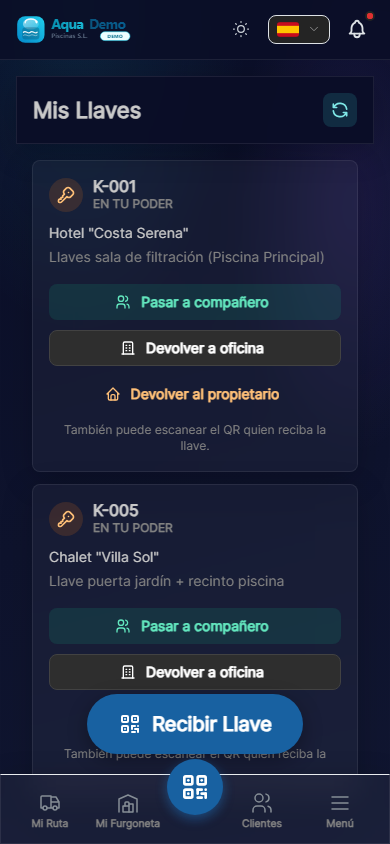
Captura con datos demo AquaDemo.Capture with AquaDemo demo data. 2. Press "Scan QR" 3. Point the mobile camera at the QR code on the key 4. The code is automatically scanned
- You will see the key data:
- Press "Confirm"
Done! The key now appears in "My Keys".
📋 See my keys
To see all the keys you have:
- Field Work → My Keys (or Menu on the mobile bottom bar)
- See list:
🔄 Return or transfer a key
In My Keys, each keychain has three actions:
| Action | Usage |
|---|---|
| Go to colleague | You choose the receiving technician (record TRANSFER) |
| Return to office | You leave the game in the company closet |
| Return to owner | End of custody (customer deregistered or handed over to the owner) |
Alternative: the partner can scan the same QR on the tag (flow equivalent to receiving a key).
Office (Key Custody /keys): print or reprint QR, view history and archive keychains without deleting data.
Coming soon
Proof photo and automatic notification to the manager on each return.
⚠️ Important: Responsibility
While the key is in "My Keys":
- ✅ You are responsible for that key
- ✅ If it is lost, you must report it immediately
- ✅ Do not lend it to another person without authorization
- ✅ Return it when you finish the work in that pool (or as indicated by the boss)
Key loss:
If you lose a key:
- Tell THE BOSS immediately
- In the app, check "Report loss"
- Describe how it happened
- The boss will manage a duplicate or change of lock
⚠️ Keys are important
Losing a key can cost money (lock change) and problems with the customer.
📊 Full flow of one faucet
❓ Frequently asked questions
"Can I have several keys to the same place?"
Yes, if there are several locks (door + booth).
"What happens if the QR doesn't scan?"
Ask the boss to give you the key manually. He can record it from the computer.
"Does the customer know who has their key?"
The boss does know. The client only if the boss tells him/her.
"Can I return the key even if the boss is away?"
Yes, check "Return to customer" or leave the key in the office with a note.
✅ Key checklist
Upon receiving a key:
- [ ] I scanned the QR
- [ ] I confirmed in the app
- [ ] I verified that the physical key opens
While I have the key:
- [ ] I keep it in a safe place
- [ ] I do not lend it without permission
When returning:
- [ ] I handed over the physical key
- [ ] Marked as returned in the app
- [ ] I made sure that the boss/client received it