

🌐 Customer Portal
What are you going to learn here? How the client area works where your clients can see information about their pools, commercial documents and services.
🎯 What is the Customer Portal?
The Customer Portal (version 2.0) is a private responsive space where your customers access their information.
What customers see:
- Multiple pools with installation selector (multi-pool clients)
- Maintenance status and water parameters
- History of visits made (filtered by pool)
- Quotes — consultation, PDF, signature and acceptance
- Orders — follow-up after accepting quotes
- Invoices — list, details and PDF
- Delivery notes — deliveries, signature of receipt and PDF (optional)
- Report incidents (floating button on mobile)
- Notification bell (responses, estimates, delivery notes, invoices)
- Contact information for your technician
🏗️ How do customers access it?
Web access (production)
Entry URL: https://poolcontrolpro.com/portal/login
There is no subdomain per company (tuempresa.poolcontrolpro.com does not exist). Each customer is identified by their email in their tenant's portal.
Login without password (magic link)
- The customer writes his email in
/portal/login. - Receive a link by email (valid for a limited time).
- By clicking the link, enter
/portal/dashboard(and other sections depending on your configuration).
For administrators
Activate or limit what the customer sees in System → Configuration → Company → Customer Portal tab: visibility (chemistry, photos, quotes, orders, invoices, delivery notes), actions (accept quotes, report incidents, create order upon acceptance) and customer notifications (email and push). See Configurable notifications.
Native client app
Today the portal is responsive web (mobile and desktop). There is no separate app in stores with that name; can be added to the home screen as a shortcut.
📋 What can customers do?
✅ See their pools
- Current state of the water (latest measurements)
- Photos of the visits
- Upcoming scheduled visits
✅ Service history
- What was done during each visit
- Applied products
- Reported incidents
✅ Budgets
- View sent quotes
- Download PDF
- Sign and accept (if activated)
- Reject offers
✅ Orders
- Tracking orders generated after accepting quotes
- Line details and PDF
✅ Invoices and payments
- View issued invoices (unified interface with KPIs)
- Download PDF from list or detail
- View payment status (balance 0 = paid; collection outside the portal)
✅ Delivery notes (optional)
- View documented deliveries
- Sign I received as agreed (pending signature)
- See client's signature and reference in the detail
- Download PDF with “Received in compliance” block
✅ Contact
- View details of your assigned technician
- Send message to technical service
- Report incidents
✅ Request services
- Request extra visit
- Request repair
- Buy products
🗺️ Portal Structure
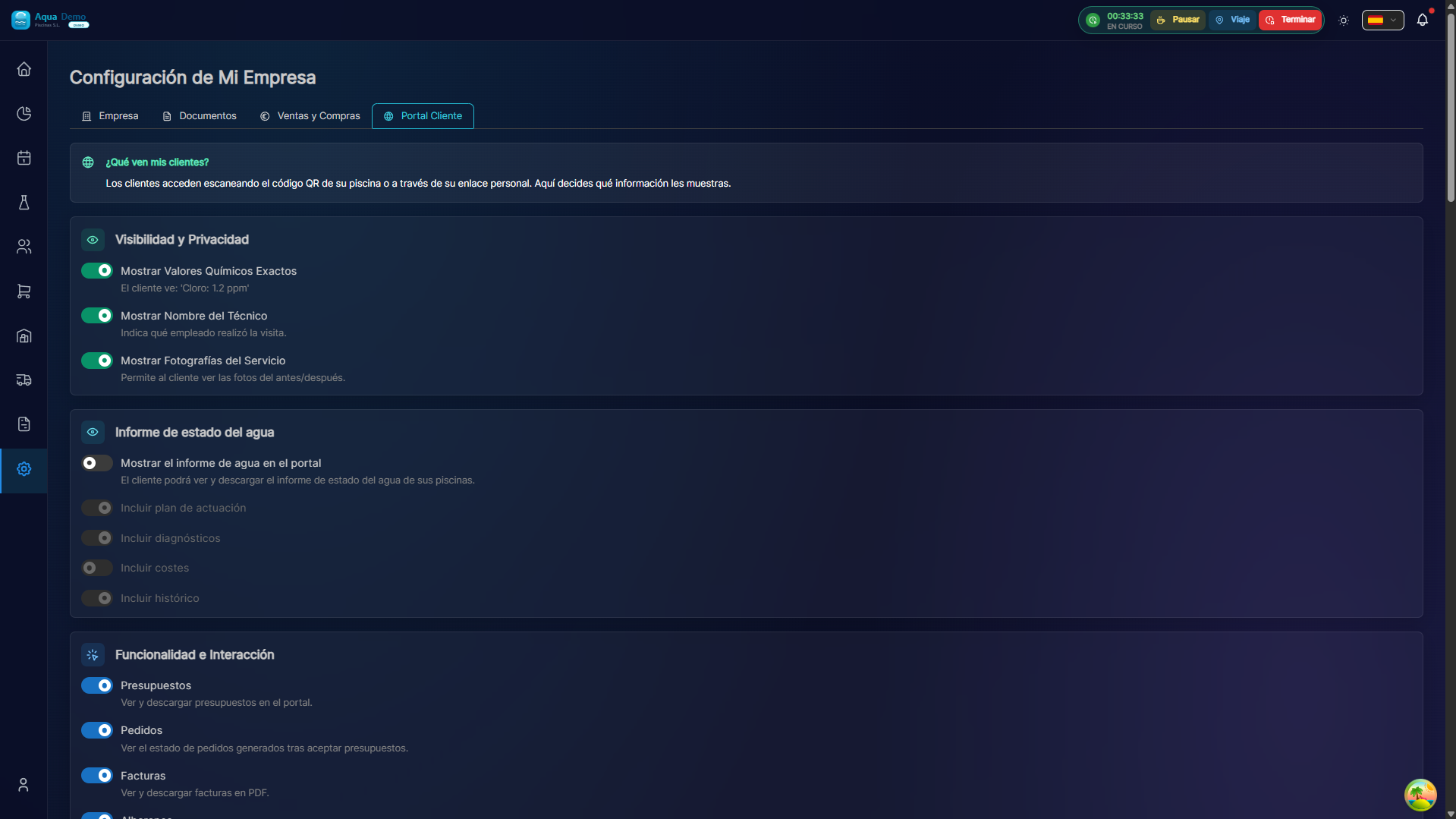
Captura con datos demo AquaDemo.Capture with AquaDemo demo data.
🔄 Complete business flow (Portal 2.0)
Envías presupuesto (SENT) desde el ERP
    → Cliente lo ve en /portal/quotes
    → Firma y acepta
    → Notificación a ADMIN + MANAGER (campanita)
    → Pedido automático (si está configurado)
    → PROJECT → Muelle de planificación
    → Trabajo + factura → Cliente paga en /portal/invoices
See details in Quotes and Quotes (ERP).
📧 Invite clients
- Activate the portal in the client's file (
isPortalActive). - Tell the client the URL: poolcontrolpro.com/portal/login.
- The client enters his email and receives the magic link (without a fixed password).
No temporary passwords
Access is by magic link, not by permanent username/password. Don't send credentials like "Temp2024" — they don't work with the current system.
❓ Frequently asked questions
"Do all clients have access?"
Only if you give it to them. It is optional for each client.
"Can the customer see prices from other customers?"
No. Each customer only sees their data.
"Can a customer see another customer's pools?"
No. Access is isolated per client.
"What if the customer can't get in?"
You must request a new link in /portal/login with your email. Check that the portal is active in your customer file.
"Does the portal have an extra cost?"
It depends on your plan. In most it is included.
✅ Activation checklist
- [ ] Portal activated in configuration
- [ ] Selected features
- [ ] Personalization (logo, messages)
- [ ] First guest client (test)
- [ ] Revised invitation email
- [ ] User guide for clients (optional)
🌐 A portal for your clients = Less work for you
Automate information and save time.