

🔄 Transfers
Estimated time: 8 minutes
Level: 🟡 Medium
Move stock from one place to another
🎯 What is a transfer?
A transfer is moving stock from one warehouse to another.
Examples:
- Load material from the central warehouse to Juan's van
- Return surplus van to the warehouse
- Move stock between two physical warehouses
Important: The total stock of the company does not change, it only changes location.
📝 STEP 1: Create transfer
How:
- Go to Store → Transfers
- Press "New Transfer"
- Fill:
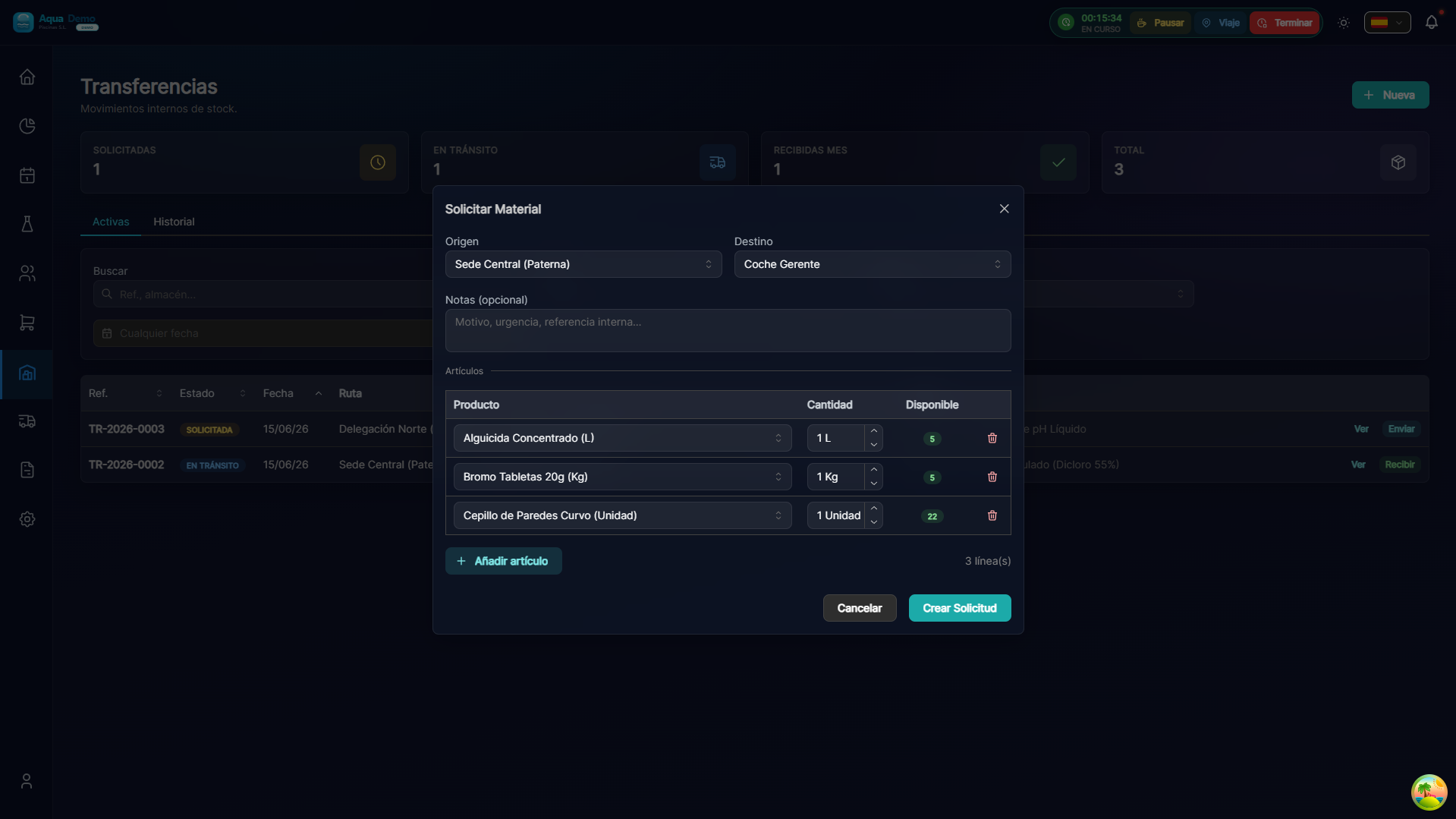
Captura con datos demo AquaDemo.Capture with AquaDemo demo data.
📊 Statuses of a Transfer
✅ STEP 3: Receive transfer
From the destination warehouse (technician app):
If everything is fine:
- Press "Confirm Complete Reception"
- The stock appears in your destination warehouse
If something is missing:
- Press "Confirm with Incident"
- Indicates what is missing
- The system adjusts the actual stock
- The origin is notified
📱 Transfers in the Technician App
Technicians can manage their transfers from their mobile:
📊 Transfer Panel
In Warehouse → Transfers you see:
┌─────────────────────────────────────────────────────────────┐
│  TRANSFERENCIAS                                            │
├─────────────────────────────────────────────────────────────┤
│                                                             │
│  PENDIENTES DE ENVIAR:                                     │
│  • #TR-2024-0158 → Furgoneta Pedro (creada hace 2h)       │
│                                                             │
│  EN TRÁNSITO:                                              │
│  • #TR-2024-0156 → Furgoneta Juan (enviada hoy 8:30)      │
│  • #TR-2024-0157 → Furgoneta Ana (enviada ayer)           │
│                                                             │
│  ÚLTIMAS RECIBIDAS:                                        │
│  ✓ #TR-2024-0155 → Furgoneta Pedro (recibida ayer)        │
│  ✓ #TR-2024-0154 → Furgoneta Juan (recibida 13/01)        │
│                                                             │
└─────────────────────────────────────────────────────────────┘
💡 Recommended workflow
For weekly vans:
Monday morning:
- Technician checks your stock in the app
- Request recharge if necessary
- Admin creates transfer
- Warehouse prepares material
Monday noon: 5. Technician goes through the warehouse 6. Material loading 7. Confirm receipt in the app
Weekend: 8. Technician reviews what you spent 9. Plan needs for the following week
❓ Frequently asked questions
"Can I cancel a transfer?"
Yes, if it is in "Pending" status. Once sent, it can only be received with incident.
"What happens if the technician does not confirm receipt?"
It remains as "In transit" indefinitely. The admin can force reception.
"Can I transfer between vans?"
Yes. Juan can give material to Pedro directly. It is recorded as a transfer.
"Can the technician order material without warning?"
No, you must request a transfer. Thus the warehouse controls outputs.
✅ Transfer checklist
When creating:
- [ ] Correct origin and destination
- [ ] Revised products and quantities
- [ ] Sufficient stock at origin
- [ ] Clear notes if necessary
When sending:
- [ ] Material prepared and counted
- [ ] Matches the transfer
- [ ] Marked as "Sent"
Upon receipt:
- [ ] Count all upon receipt
- [ ] Check quantities
- [ ] Confirm or report incidents
🔄 Transfers move business
From the warehouse to the street, from the supplier to the customer. Constant flow.