

🚫 Product Quarantine
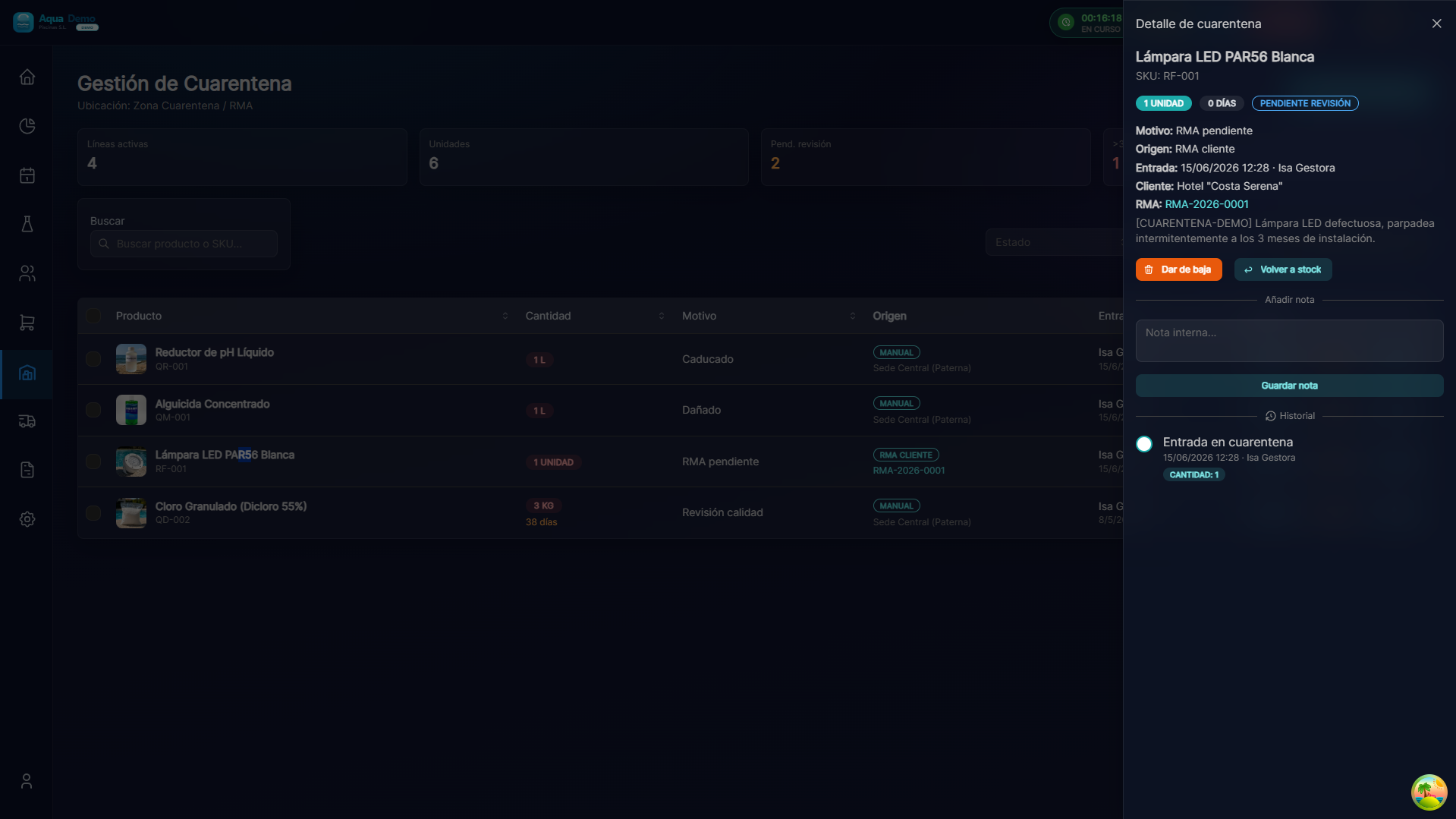
Captura con datos demo AquaDemo.Capture with AquaDemo demo data.
TL;DR
Quarantine is a special status where you put products that should NOT be sold or used: damaged, expired, under quality review, or awaiting decision. It is separate from the available stock.
What is it for?
When to quarantine products:
- 📦 Damaged in transport - Broken box, contents visibly affected
- 📅 Expired or close to expiry - Past best before date
- 🔍 Under review - You detect something strange, you need to verify quality
- ↩️ Waiting for RMA - Product that you are going to return to the supplier
- 🧪 Market recall - The manufacturer warns of a defective batch
What to avoid:
- ❌ Sell damaged product to customers
- ❌ Use expired product in swimming pools
- ❌ Let the "bad" stock mix with the "good" stock
🟢 Send to Quarantine
From warehouse
- Go to Inventory → Quarantine → New
- Or from Warehouse stock → select product → 🚫 Send to quarantine
- Complete the form:
| Field | What to wear | Example |
|---|---|---|
| Product | What are you going to isolate | Granulated chlorine 5kg |
| Lot | Affected lot number | LOT-2025-CAD-001 |
| Quantity | How many units | 10 |
| Warehouse | Where is it | Central Warehouse |
| Reason | Why do you isolate it | Expired |
| Description | More details | "Preferred consumption date: 01/15/2025" |
Step 2: Confirm
- Click 🚫 Send to Quarantine
- The system:
- Stock discount available
- Add to stock in quarantine
- Block the lot for sales
ANTES:
Stock disponible: 50 unidades
Stock cuarentena: 0 unidades

↓ Envías 10 unidades a cuarentena

DESPUÉS:
Stock disponible: 40 unidades  ← El sistema no deja vender estas 10
Stock cuarentena: 10 unidades  ← Aisladas del stock disponible
🟡 Types of Quarantine
| Type | Icon | What does it mean | Typical action |
|---|---|---|---|
| Expired | 📅 | Past best before date | Destroy or return |
| Damaged | 📦 | Damaged packaging or product | RMA to supplier |
| Review | 🔍 | Quality in doubt, checking | Check and decide |
| RMA Pending | ↩️ | Waiting to return to supplier | Send in next RMA |
| Withdrawal | 🚫 | Manufacturer withdraws from the market | Return or destroy |
| Sample | 🧪 | For laboratory analysis | Laboratory |
📊 Quarantine Dashboard
Go to Inventory → Quarantine to see:
PRODUCTOS EN CUARENTENA

📅 CADUCADOS (3 productos)
├─ Cloro 5kg - Lote CAD001 - 10 unidades - 15/01/2025
├─ pH- Líquido - Lote CAD002 - 5 unidades - 10/01/2025
└─ Algicida - Lote CAD003 - 2 unidades - 01/01/2025

📦 DAÑADOS (2 productos)
├─ Manguera 50m - Lote DMG001 - 1 unidad - Caja rota
└─ Limpiafondos - Lote DMG002 - 1 unidad - Mango roto

🔍 EN REVISIÓN (1 producto)
└─ Bomba 1CV - Lote REV001 - 1 unidad - No arranca, revisar
🟢 Remove from Quarantine (Release)
If you check and the product is fine:
- In the quarantine panel, search for the product
- Click ✅ Release
- Indicates the reason: "Reviewed OK, labeling error"
- The product returns to available stock
⚠️ Only release if you are 100% sure. If in doubt, better destroy or return.
🔴 Destroy Product
When the product is useless and cannot be returned:
- In quarantine, click 🗑️ Destroy
- Complete the destruction certificate:
- Destruction date
- Reason (expired, unrecoverable...)
- Person responsible for destroying it
- Witness (optional, recommended)
- The system definitively discounts the stock
ACTA DE DESTRUCCIÓN #DES-2025-003

Producto: Cloro granulado 5kg
Lote: CAD001
Cantidad: 10 unidades
Motivo: Caducado (15/01/2025)
Fecha destrucción: 20/01/2025
Responsable: Juan García
Testigo: María López

✅ Producto destruido según protocolo ambiental
📅 Expiration Alerts
The system can notify you before it expires:
Configuration
Go to Settings → Warehouses → Expiration Alerts:
| Alert | When notifies | Example |
|---|---|---|
| 🟡 Preventive | 30 days before | Gives you time to sell at a discount |
| 🟠 Attention | 7 days before | Last chance to use |
| 🔴 Review | Expiration day | Send to quarantine immediately |
Recommended actions
30 days before:
- Mark for promotion
- Prioritize POS sales
- Notify technicians to use on routes
7 days before:
- Aggressive discount
- Use in own maintenance
- Offer to regular customers
Expired:
- Send to quarantine automatically
- Decide: destruction or RMA (if the supplier accepts)
💡 Pro Tips
💡 FIFO (First In, First Out) Physically organize the warehouse so that the oldest products are in front. This is how they are used first.
💡 Weekly Quarantine Review Dedicate 15 minutes every Monday to review quarantine. Decide what to release, destroy or return.
💡 Photos of destruction If you destroy product, take photos of the process. Some audits request it.
💡 Negotiate with suppliers Ask regular suppliers to accept returns for products that are about to expire. Some do it at a discount.
❓ Frequently Asked Questions
Does the product in quarantine count towards the total stock? Yes and no. It appears in physical inventory (it is in your warehouse) but is NOT available for sales or consumption.
Can I move quarantine product between warehouses? No. You must first release it (return to available stock), move it, and if necessary, quarantine it again.
What happens if I sell an expired product by mistake? The system usually blocks it. If you sell it manually (forcing), it is registered. In case of a health inspection, you will have a record of who sold it.
Can technicians use product in quarantine? No. The technician app only shows available stock. The quarantine is blocked for all consumption.
See also
- Stock Control - General inventory management
- RMA - Returns - Return to supplier
- Transfers - Move stock between warehouses
Quarantine Dashboard (Example)
┌─────────────────────────────────────────────────────────┐
│  PRODUCTOS EN CUARENTENA           Últimos 30 días     │
├─────────────────────────────────────────────────────────┤
│                                                         │
│  Total productos: 23        Valor bloqueado: 1.245 €    │
│                                                         │
│  Por tipo:                                              │
│  📅 Caducados      ████████████████ 12 (52%)           │
│  📦 Dañados        ████████ 6 (26%)                    │
│  ↩️ RMA Pendiente  ███ 3 (13%)                         │
│  🔍 Revisión       ██ 2 (9%)                           │
│                                                         │
│  Acciones pendientes:                                   │
│  • 3 productos caducados → Destruir (superado plazo)   │
│  • 2 productos dañados → Crear RMA                     │
│  • 1 revisión → Verificar calidad (María)              │
│                                                         │
└─────────────────────────────────────────────────────────┘