

🛣️ Master Routes
Estimated time: 10 minutes
Level: 🟡 Medium
Automate weekly planning
Access
Operational → Master Routes (/planning/routes). Create/edit templates; The system materializes visits according to frequency and season.
🎯 What are Master Routes?
Master routes are templates that define which pools to visit, how often and in what order. The system generates visits automatically every day.
Example:
- "North M-F" Route → North Zone, Monday/Wednesday/Friday
- "Daily Center" Route → Central Zone, from Monday to Friday
✅ Available Features
Create Master Route
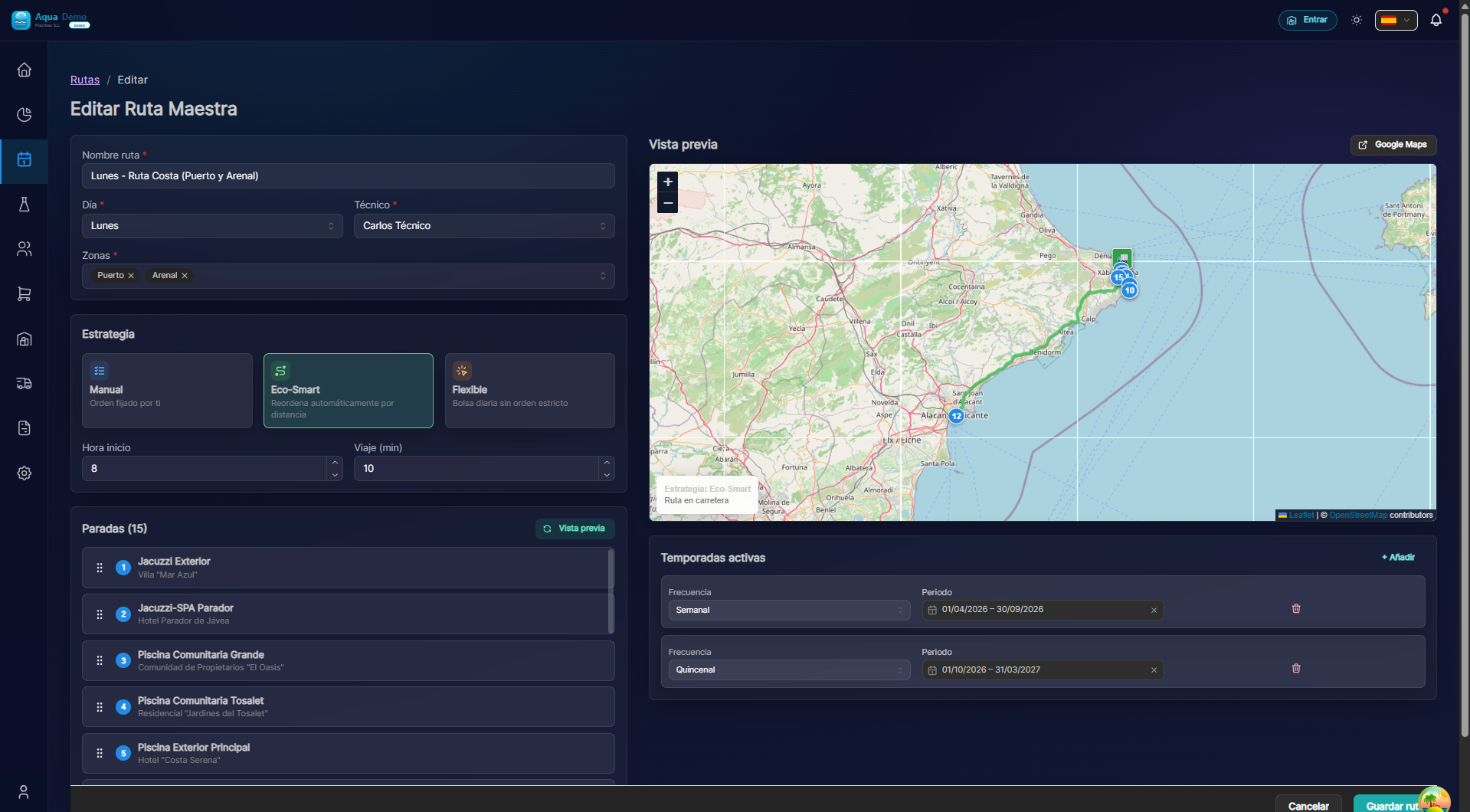
Captura con datos demo AquaDemo.Capture with AquaDemo demo data.
🤖 Automatic Visit Generation
Status: ✅ IMPLEMENTED AND WORKING
The system automatically generates visits every day through a scheduled job:
Supported frequencies:
| Frequency | Description | Example |
|---|---|---|
| WEEKLY | Weekly | Every Monday |
| BIWEEKLY | Biweekly | Every 2 weeks |
| MONTHLY | Monthly | First Monday of the month |
| QUARTERLY | Quarterly | First Monday of January/April/July/October |
🧭 Route Optimization
Status: ✅ IMPLEMENTED
The system includes automatic optimization based on GPS:
🔄 Seasons
Defines when each route applies:
TEMPORADA ALTA (Verano):
• Frecuencia: L-M-X-J-V (5 días)
• Duración: 1 junio - 15 septiembre
• Más visitas, más producto

TEMPORADA MEDIA:
• Frecuencia: L-M-V (3 días)
• Duración: 1 abril - 31 mayo

TEMPORADA BAJA (Invierno):
• Frecuencia: Lunes (1 día)
• Duración: 16 septiembre - 31 marzo
💡 Good Practices
1. One route per technician and area
Juan: Ruta Norte (L-M-V)
Juan: Ruta Centro (X-J)  ← El mismo técnico puede tener varias
2. Frequency depending on pool type
Piscinas públicas (hoteles): Diario o L-M-V
Comunidades: L-M-V
Particulares: 1-2 días/semana
3. Verify generation
Check every morning that the visits have been generated correctly in the calendar.
❓ Frequently Asked Questions
"Do master routes create visits automatically?"
Yes. A job runs every day at 4:00 AM and generates the corresponding visits according to the configured frequency.
"Can I generate visits manually?"
There is currently no manual button. The system generates automatically. If you need additional visits, create them manually from the calendar.
"What happens if I change the technician of a route?"
The visits already generated maintain the original technician. The new ones will use the new technician.
"Can I temporarily pause a route?"
Yes, by adjusting the seasonal dates or unchecking all days of the week.
"Is the order of visits respected?"
It depends on the strategy: "MANUAL" respects the order of the zones, "OPTIMIZED" reorders by GPS.
✅ Configuration Checklist
- [ ] Create master route with friendly name
- [ ] Assign responsible technician
- [ ] Define frequency (days of week)
- [ ] Set season (months of application)
- [ ] Select geographic areas
- [ ] Set estimated start time
- [ ] Choose optimization strategy
- [ ] Verify that visits are generated automatically