

📆 The Calendar (Agenda)
Estimated time: 10 minutes
Level: 🟢 Easy
This is the screen you will use every day
🎯 What is the calendar?
The calendar is the main planning screen. Here you see:
- Which pools are cleaned each day
- Which technician goes to each one
- What time
- The status of each visit
📝 How to get to the calendar
- Operational tab → Agenda (Drag & Drop).
- Path:
/app/pool-control/planner.
Common actions on this screen:
- + Visit → modal Schedule Visit → Create Visit (or recurrence).
- Drag events to reschedule (depending on permissions).
- pending work panel (dock): overdue visits, unassigned, projects.
- Multiple selection mode + batch reprogramming.
- Filters by technicians and zones above.
🖥️ How does it look?
Weekly View (most used)
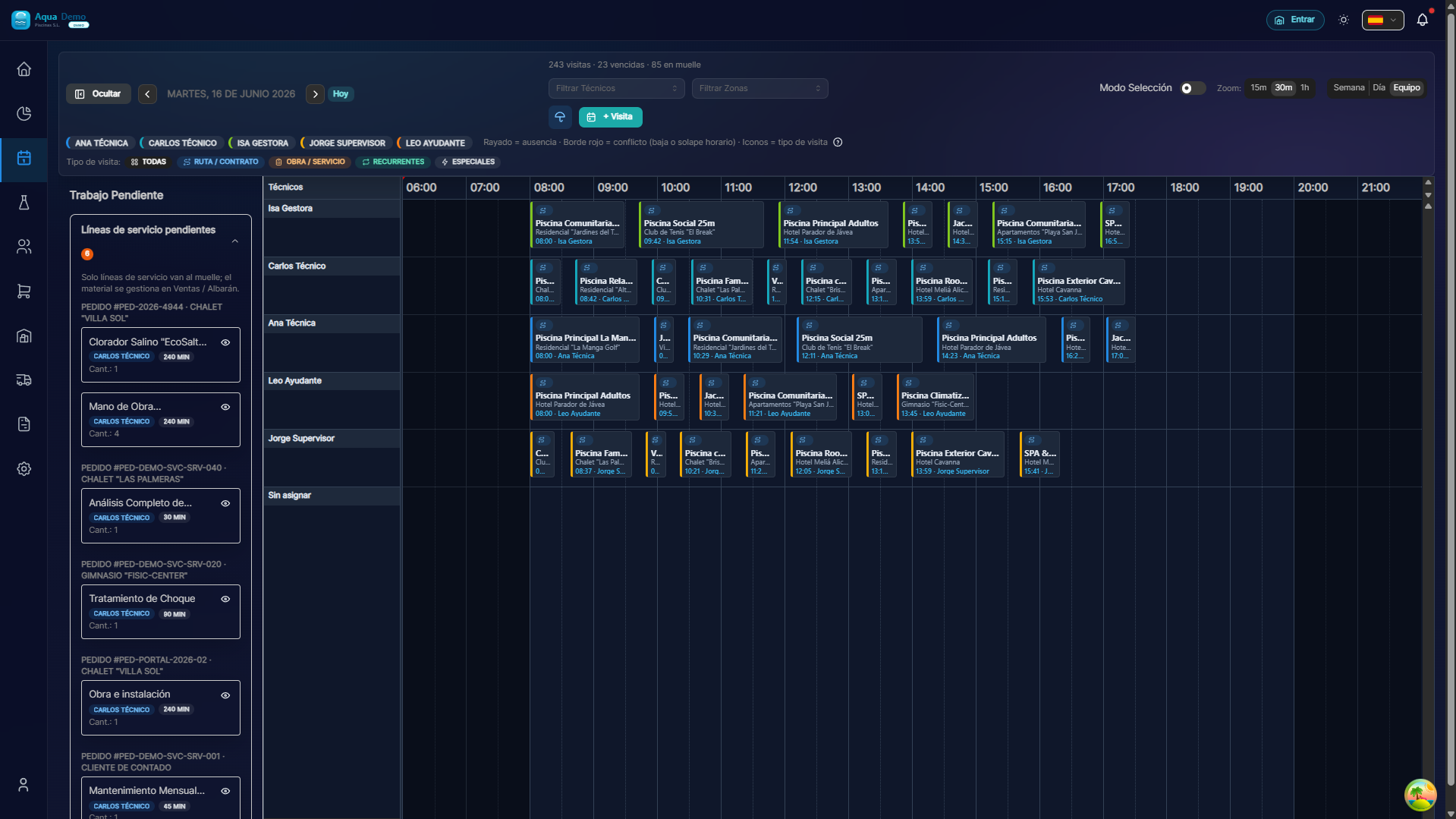
Captura con datos demo AquaDemo.Capture with AquaDemo demo data.Actual capture of Operation → Agenda (/app/pool-control/planner), demo manager user.
Color legend:
| Color | Meaning |
|---|---|
| 🔵 Blue | Juan (assigned technician) |
| 🔴 Red | Pedro (assigned technician) |
| 🟢 Green | Ana (assigned technician) |
| ⬜ Gray | Unassigned (loading dock) |
🎮 How to navigate
Change week
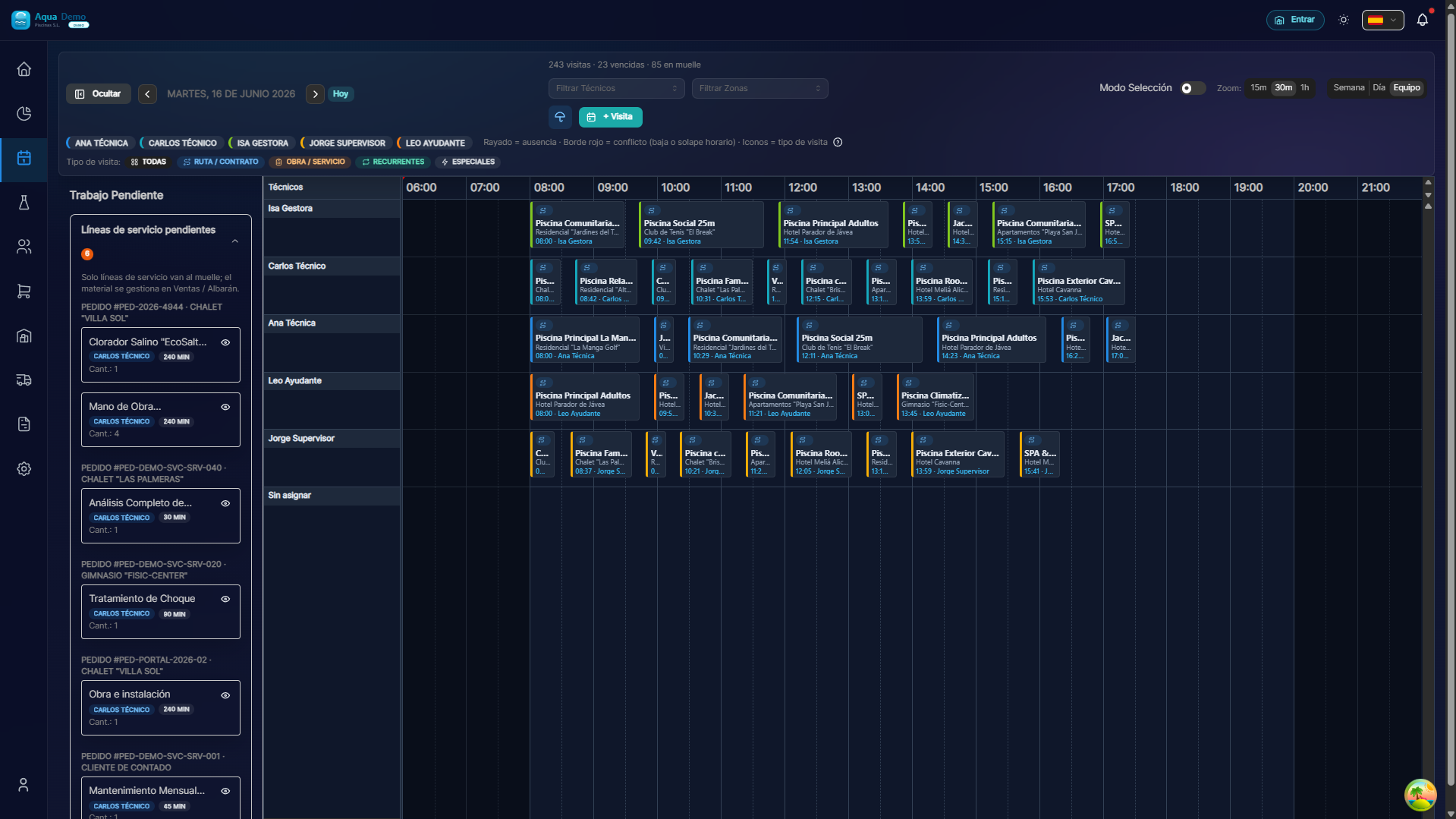
Captura con datos demo AquaDemo.Capture with AquaDemo demo data.What is it? Visits that must be made but do not yet have a technician assigned.
How to use it:
- Drag a dock visit to the calendar
- Release on the day/time you want
- Ready! It is already assigned
⚙️ Configure slot duration
You can change how "grainy" the calendar is:
Duración slot: [15 min ▼]
├── 15 minutos (muy detallado)
├── 30 minutos (recomendado)
└── 60 minutos (más general)
Recommendation: 30 minutes is the standard for most pools.
💡 Tips for using the calendar
Tip 1: Colors by technician
Each technician has a color. At first glance you can see who has more load.
Tip 2: Detect gaps
If you see white gaps on your calendar, it's unallocated time.
Tip 3: Saturdays and Sundays
By default they are not shown, but you can activate them if you work weekends.
Tip 4: Print View
If you need to print the schedule, use List view and then print.
❓ Frequently asked questions
"Can I see the calendar on my mobile?"
Yes, but it is more comfortable on a computer to plan. On the mobile phone the technician only sees his route for the day.
"Does it update in real time?"
Yes, if another user makes changes, they are seen on reload.
"Can I zoom into the calendar?"
Yes, with Ctrl + mouse wheel (or click on mobile).
"What happens if I drag a visit to another technician?"
The assigned technician is changed automatically.
✅ Checklist: Do you master the calendar?
- [ ] I know how to navigate between weeks
- [ ] I know how to go back to "Today"
- [ ] I know how to filter by technician
- [ ] I know how to filter by area
- [ ] I know how to create a visit by clicking
- [ ] I know how to move a visit by dragging
- [ ] I know how to use the loading dock
📆 The calendar is your best friend
Use it daily and you will have everything under control.