

🔔 Alerts and Notifications
Estimated time: 5 minutes
Level: 🟢 Easy
The system notifies you when something important happens
🎯 What are alerts?
Alerts are messages that appear on the technician's mobile phone to notify them of something important.
Alert types:
- 📍 GPS - When you leave the pool
- ⏱️ Inactivity - When you haven't touched your phone for a long time
- 🔔 Reminders - Upcoming visits, transfers...
- ⚠️ System - Errors, synchronization, etc.
📍 GPS Alert
When it appears:
When the technician moves more than 500 meters from the pool where he should be working.
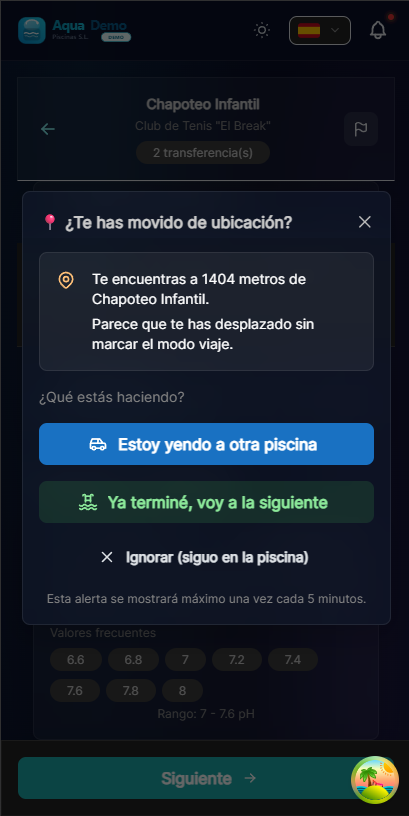
Captura con datos demo AquaDemo.Capture with AquaDemo demo data.
Options:
| Button | When to use it |
|---|---|
| Start Trip | I'm going by car to another pool |
| Next Pool | I'm done here, I'm going to the next one |
| Pause Work | I stop to eat or run an errand |
| Ignore | It's a GPS error (I'm usually here) |
⏱️ Inactivity Alert
When it appears:
When you haven't touched the app for 10 minutes (without recording activity).
Why it is useful:
- Prevent the timer from remaining active if you forget to close
- Save mobile battery
- More precise data on time worked
🔔 Push Notifications
Push notifications are messages that appear even when the app is closed:
Types of notifications:
| Type | When does it arrive | Example |
|---|---|---|
| New visit | They assign you a new pool | "New visit: Hotel La Palmera tomorrow at 10:00" |
| Transfer | Someone pays you a visit | "Carlos wants to visit you. Do you accept?" |
| Reminder | Visit in 30 minutes | "You have Casa García in 30 minutes" |
| Synchronization | Pending data | "You have 3 parts pending synchronization" |
| Low stock | Scarce material | "You have less than 5kg of chlorine left" |
⚙️ Configure Notifications
In the app:
- Go to More → Settings → Notifications
- Activate/deactivate each type:
📱 Required permissions
For notifications to work, you need to give permissions:
Android:
- Settings → Apps → PoolControl → Notifications
- Allow notifications: YES
- Allow in foreground: YES
iPhone:
- Settings → PoolControl → Notifications
- Allow notifications: YES
- Show on lock screen: YES
❓ Frequently asked questions
"Why am I not receiving notifications?"
- Check that they have permissions activated
- Check that it is not on "Do not disturb"
- Some Android phones kill apps in the background (search for "battery optimization")
"Do they use a lot of battery?"
No. Notifications use very little battery.
"Can I mute them on weekends?"
Yes, in settings you can put "Working hours" and they will only ring during those hours.
"Does the boss see when I ignore an alert?"
No. Alerts are to help you, not to spy on you.
✅ Configuration checklist
- [ ] Notifications activated on mobile
- [ ] Location permissions given (for GPS)
- [ ] Sound activated (so you don't miss alerts)
- [ ] Alert types configured to your liking