

Real menu (Finance)
Customer billing, Mass generation (/financials/invoicing/generate), Collections, Bills portfolio, SEPA remittances. Panel: /financials/account-status.
🧾 Billing
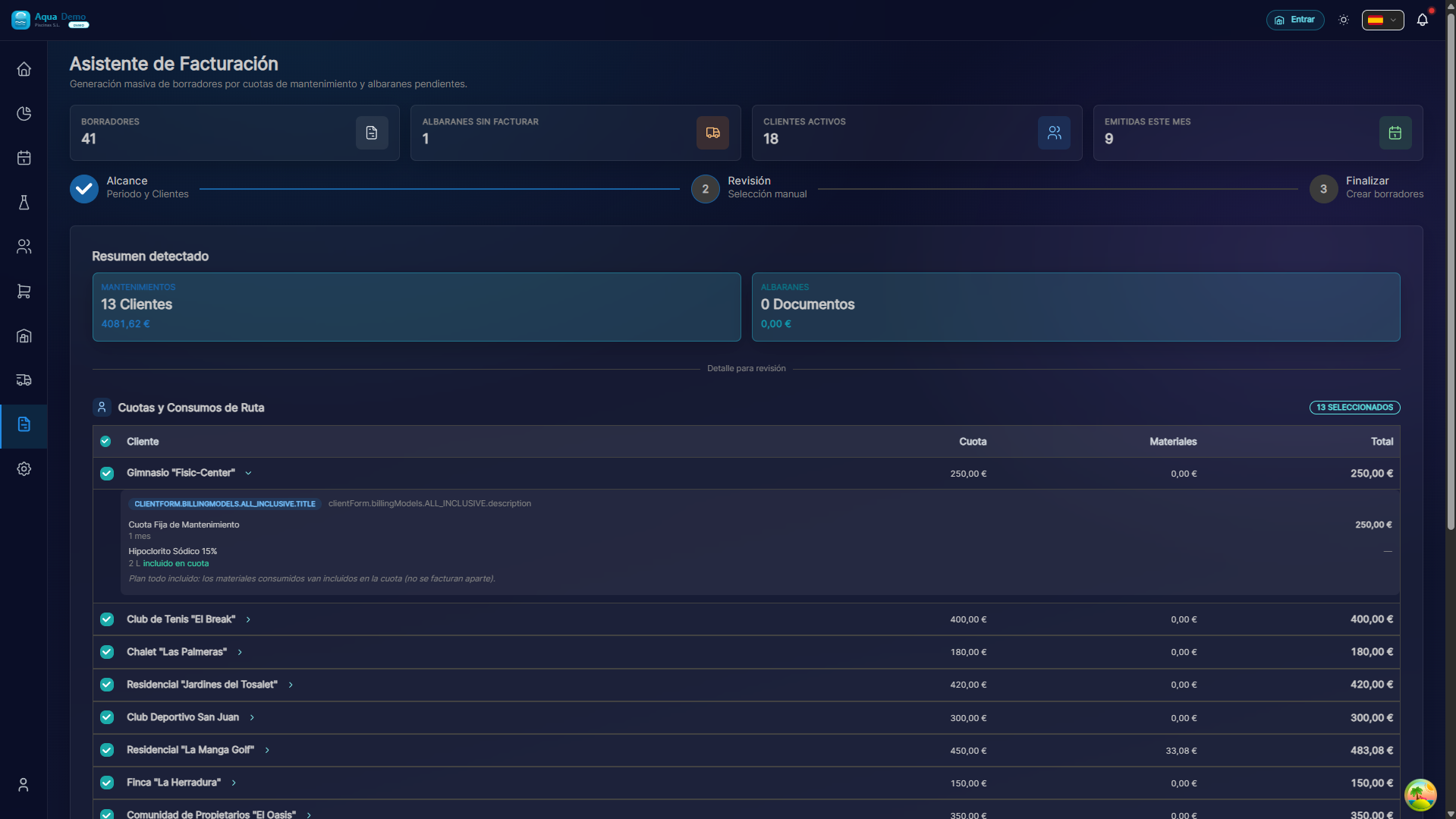
Captura con datos demo AquaDemo.Capture with AquaDemo demo data.
What are you going to learn here? How to generate customer invoices, manage collections, make bank remittances and correct errors.
🎯 What is the Billing module?
This module is used to charge clients for the work performed.
Examples of use:
- Generate the monthly maintenance invoice
- Collect a sale at the counter
- Make a bank remittance with all the invoices of the month
- Create a corrective invoice for an error
Billing flow:
1. TRABAJO REALIZADO (visitas, ventas...)
           ↓
2. GENERAR FACTURA (automática o manual)
           ↓
3. ENVIAR AL CLIENTE (email o impresa)
           ↓
4. COBRAR (efectivo, transferencia, domiciliación)
           ↓
5. CONTABILIZAR (exportar a programa de contabilidad)
🏗️ Key concepts
1️⃣ Invoice Types
| Type | When to use | Example |
|---|---|---|
| Ordinary invoice | The normal, service charge | Monthly maintenance bill |
| Simplified invoice | Small sales in store | POS ticket |
| Amending invoice | Correct a previous invoice | Return money by mistake |
| Pro forma invoice | Formalized budget | Before signing contract |
2️⃣ Invoice Status
FLUJO DE ESTADOS:

🟡 BORRADOR → 🟢 EMITIDA → 🔵 COBRADA → ⚪ CONTABILIZADA
    (creada)    (enviada)   (pagada)     (en contabilidad)
        ↓
🔴 ANULADA (si hay error grave)| Status | Meaning |
|---|---|
| Draft | Created but not sent to client |
| Issued | Sent to the client, pending collection |
| Charged | Customer has paid |
| Expired | Payment date passed without payment |
| Cancelled | Canceled (with rectification) |
3️⃣ Payment Methods
| Shape | Description | When to use |
|---|---|---|
| Transfer | Client transfers you | Occasional clients |
| Domiciliation | You charge directly from your account | Recurring clients |
| Cash | They give you money in hand | Store sales |
| Card | Payment with dataphone | POS |
| PayPal/Online | Online payment | Client portal |
📋 What can you do here?
✅ Billing Assistant
- Generate automatic invoices for visits
- Review consumption before billing
- Bill by periods (monthly, quarterly)
✅ Invoice Management
- View all invoices issued
- Search by client, date, amount
- Download PDF
- Send by email
- Cancel invoices
✅ Collections and Portfolio
- Record payments received
- View pending invoices
- Control expirations
- Generate receipts
✅ Bank Remittances
- Group invoices for bank collection
- Generate SEPA/19 file
- Upload to online bank
- Control returns
✅ Rectifying Invoices
- Create credits for errors
- Return money to clients
- Correct amounts
✅ Settings
- Billing series (A, B, R...)
- Invoice templates
- Automatic numbering
- Default taxes
🗺️ Navigation map
📁 INVOICING
│
├── 🧙 [Billing Wizard](./billing-wizard)
│   └── Generate automatic invoices from visits
├── 📄 [Invoice Management](./invoice-management)
│   └── View, send, void, download PDF
└── 💰 [Payment Portfolio](./portfolio)
    └── Record payments, due dates, bank
🎓 Billing Glossary
| Term | Meaning |
|---|---|
| Invoice | Customer collection document |
| Receipt | Document proving payment |
| Expiration | Payment deadline |
| Remittance | Set of invoices receivable by bank |
| Domiciliation | Automatic charge to customer account |
| Rectification | Invoice that corrects a previous one |
| Tax base | Amount without VAT |
| VAT quota | Tax amount |
| Total | Final amount with VAT |
💡 When to use each function?
It's the end of the month and you have to invoice:
→ Go to Billing Assistant → Generate invoices for the period
A customer says they did not receive the invoice:
→ Go to Invoice Management → Search → Resend by email
I want to know who owes money:
→ Go to Collections and Remittances → Pending invoices
I made a mistake on an invoice:
→ Go to Amending Invoices → Create credit
Many clients have to be charged by bank:
→ Go to Collections and Remittances → New remittance