

📴 Offline Mode
Estimated time: 6 minutes
Level: 🟢 Easy
Works without coverage, in basements, rural areas...
🎯 What is offline mode?
Offline mode allows you to use the technician app without internet.
Why is it necessary?
Many swimming pools are in:
- 🏢 Building basements (no coverage)
- 🌾 Rural areas (bad signal)
- 🏊 Remote urbanizations
- 🏨 Hotels with paid Wi-Fi for clients only
What can you do without the internet?
- ✅ See your route for the day (if you downloaded it before)
- ✅ Fill in work reports
- ✅ Save everything on your mobile
- ❌ You cannot send parts to the server
- ❌ You cannot see maps in real time
📥 STEP 1: Download the route (with wifi)
IMPORTANT: You must do this before leaving, while you have internet.
How to download:
- Open the app with Wi-Fi
- Go to My Route
- At the top right, look for cloud icon ☁️ or "Download"
- Press "Download route of the day"
What is downloaded:
- 📍 All visits today
- 📋 Configuration of each pool (tasks, parameters)
- 📦 Your van stock
- 📞 Customer contact details
Confirmation:
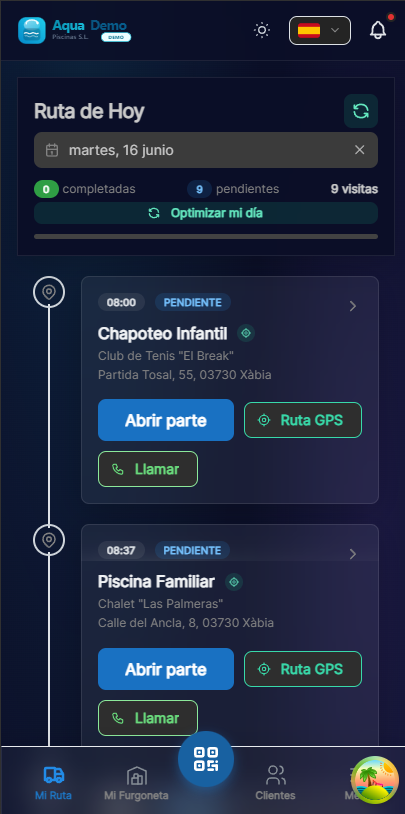
Captura con datos demo AquaDemo.Capture with AquaDemo demo data.
⚠️ Do this every morning
The download is valid for the current day only. Tomorrow you will have to download again.
🔧 STEP 2: Work without internet
During the day:
Use the app normally:
- You see your route (it is already saved on your mobile)
- You get to the pool
- Fill out the report (it is saved locally)
- You move on to the next
Offline indicator:
You will see an icon or message:
Don't worry:
- ✅ Everything is saved on your mobile
- ✅ Nothing is lost
- ✅ Everything works the same
🔄 STEP 3: Sync (when there is wifi)
When to sync:
- When you finish the day and get home/office with Wi-Fi
- When you pass through an area with coverage
- At a gas station with free wifi
How to sync:
- Connect your mobile to Wi-Fi (or activate data)
- Open the app
- Automatically starts synchronizing
- You will see cloud syncing icon 🔄
Confirmation:
📊 What is synchronized?
| Data | Saved offline | It syncs later |
|---|---|---|
| Working parts | ✅ Yes | ✅ Yes |
| Photos | ✅ Yes | ✅ Yes (it may take time) |
| Arrival GPS | ✅ Yes | ✅ Yes |
| Stock consumed | ✅ Yes | ✅ Yes |
| Route changes | ❌ No | You need internet |
⚠️ Limitations of offline mode
Things you CANNOT do without the internet:
Receive route changes
- If the boss changes your route while you are offline, you won't see it until you sync
- Solution: Download the route just before leaving
View navigation maps
- Google Maps needs internet
- Solution: Use car GPS or check the address before going
Call from the app
- Call customer button needs to load the number
- Solution: Point the phones before leaving
Request transfers
- You need internet to send the application
- Solution: Call the boss on the phone
💡 Tips for working offline
Tip 1: Always download before leaving
Even if you think there will be coverage. Just in case.
Tip 2: Sync when finished
Don't wait until the next day. Synchronize as soon as you can.
Tip 3: Photos carefully
Photos take up space. If you make a lot, sync early to free up space.
Tip 4: Check pending
Before going to bed, check that there is nothing left to synchronize.
❓ Frequently asked questions
"How much space does the downloaded route take up?"
Very little. A few photos take up more than the entire route.
"What if I forget to sync and it's already tomorrow?"
No problem. The data is still on the mobile. Sync when you can.
"Can I work for several days without syncing?"
Yes, but it is not recommended. If you lose your phone, you lose everything.
"Does the boss know I'm offline?"
Not directly. It will only see that you haven't synced yet.
"Are the photos also saved offline?"
Yes, but they take up more. Sync soon to free up space.
✅ Offline mode checklist
Before leaving (with wifi):
- [ ] I downloaded the route of the day
- [ ] I saw that it says "Route downloaded successfully"
During the day:
- [ ] I worked normally even though there was no coverage
- [ ] I filled out all the parts
When finished (with wifi):
- [ ] I opened the app
- [ ] I waited for it to sync
- [ ] I saw "Synchronization completed"
- [ ] I checked that there was nothing pending
📴 Offline mode allows you to work anywhere
Basements, caves, the countryside... It doesn't matter. Work and sync later.