

💰 Billing Issues
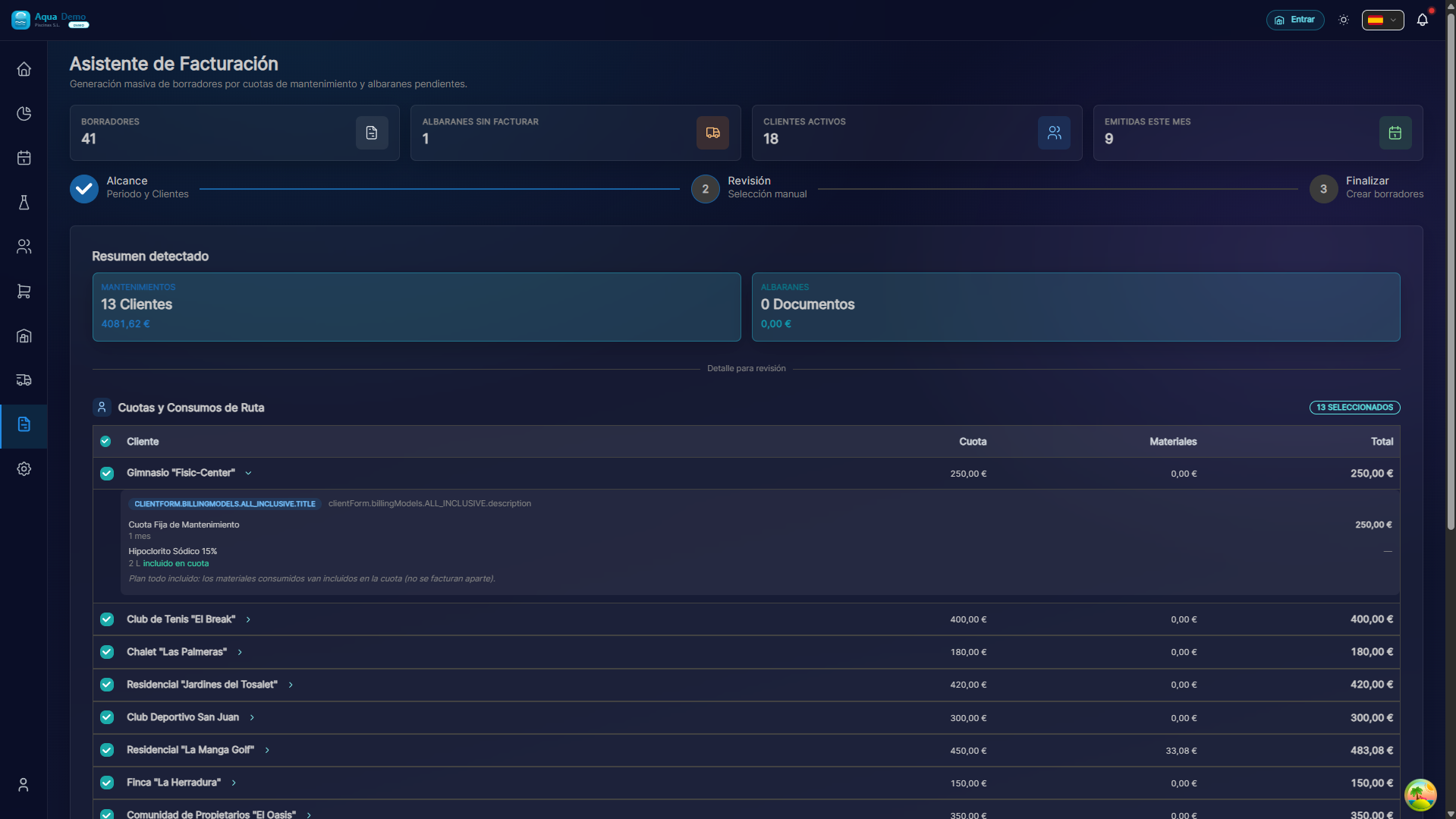
Captura con datos demo AquaDemo.Capture with AquaDemo demo data.
Level: 🟡 Medium
When invoices go wrong or not at all
🎯 Most common problems
| Problem | Symptom | Quick fix |
|---|---|---|
| Invoice with amount 0 | It costs €0 | Review customer payment method |
| Does not generate invoice | Error creating | Check that the period is closed |
| Incorrect products | Products that are not | Review recorded consumption |
| Duplicate invoice | Same invoice 2 times | Cancel one and create rectification |
| Client does not appear | Does not appear in billing | Check client status and dates |
📝 Step by step solution
Problem: "The invoice is €0"
Why it happens: The client has the payment mode configured incorrectly.
Solution:
- Go to Clients → Client file
- Check the field "Collection mode":
Modo de cobro actual: [Ver configuración]

Si pone "TODO INCLUIDO":
├── La cuota mensual ya incluye productos
├── Los consumos no se facturan aparte
└── Revisa: ¿La cuota mensual está configurada?

Si pone "CUOTA + CONSUMOS":
├── Debe salir: Cuota + Productos usados
└── Si solo sale cuota: No hay consumos registrados

Si pone "SOLO SERVICIO":
├── Solo se cobra el trabajo
└── Los productos no se facturan (son del cliente)
To fix it:
- If you want to charge for products: Change to "Fee + Consumption"
- If the products are included: Check that the fee includes the appropriate value
Problem: "It won't let me generate invoices"
Possible causes:
The period is not closed:
- Go to Billing → Period Closing
- Close the previous month before billing the new one
Client is inactive:
- Go to Clients → Status
- Inactive clients are not billed
- Activate it temporarily if necessary
There are no visits during the period:
- If no work was done, there is nothing to invoice
- Check the calendar
The client does not have a quota configured:
- All Inclusive and Fee+Consumptions require monthly fee
- Go to Client → Business Settings
Problem: "The invoice has products that we do not use"
Why it happens: The technicians recorded the consumption incorrectly.
Solution:
Before generating the invoice:
- Go to Billing → Billing Assistant
- Review the proposed consumption
- Edit the ones that are wrong:
❌ 50kg de cloro (demasiado) ✅ 5kg de cloro (corregido) - Generate the invoice with the correct data
If you have already generated the invoice:
- DO NOT delete it (break the numbering)
- Create a Amending Invoice:
- Billing → New Rectification
- Select the wrong invoice
- Indicates the correct amount
- The rectification "cancels" the difference
Problem: "Duplicate invoice"
Why it happens: You pressed "Generate" twice or there was a connection error.
Solution:
- Identify which is the correct invoice (usually the first one)
- The duplicate (the second), create a rectification that cancels it 100%
- Mark the duplicate as "Cancelled" (so that it is not counted)
- Inform the client to ignore the duplicate
Note: Never delete invoices. Always use rectifications.
Problem: "The customer does not appear in billing"
Check these points:
CHECKLIST:
☑️ Estado del cliente = "Activo" (no Lead ni Inactivo)
☑️ Tiene piscinas activas
☑️ Tiene visitas completadas en el periodo
☑️ Tiene modo de cobro configurado
☑️ Tiene cuota mensual (si aplica)
☑️ El periodo está dentro de las fechas de contrato
☑️ No está marcado como "No facturar"
If everything is fine and it still does not appear, contact support.
💡 Error prevention
Before billing:
Check out the billing wizard
- Shows everything that is going to be invoiced
- Detect errors before generating
Check for strange consumption
- If a client has 100kg of chlorine, check
- Probably the technician put an extra zero
Build in draft first
- Some systems allow "Preview"
- Check before confirming
After billing:
Review generated invoices
- See the first ones of each typical client
- If there is a bug, it is probably in more places
Send the accountant with care
- Once sent to the accounting program, it is more difficult to fix
❓ Frequently asked questions
"Can I delete an invoice?"
NO. Tax law does not allow invoices to be deleted once they have been issued. Use rectifications.
"How do I cancel an invoice?"
You create a corrective invoice with the same negative amount. That fiscally "annuls" the first one.
"Why does a customer have 2 invoices this month?"
Probably:
- Manual and automatic generation
- There was a period closure in the middle of the month
- Check dates of both invoices
"Can I change the date of an invoice?"
NO. The date is the date of issue. If you need another date, cancel it and create a new one (but be careful with the numbering).
🆘 If nothing works
If you have a billing problem that you cannot resolve:
- DO NOT generate more invoices (you can make it more complicated)
- Documents:
- Which client has the problem
- Which invoice is wrong (number)
- What should come out vs what comes out
- Contact support:
- Email: soporte@poolcontrolpro.com
- Includes screenshots
💰 Billing must be perfect
A mistake here is lost money or an angry customer. Check it well.