

📍 GPS problems
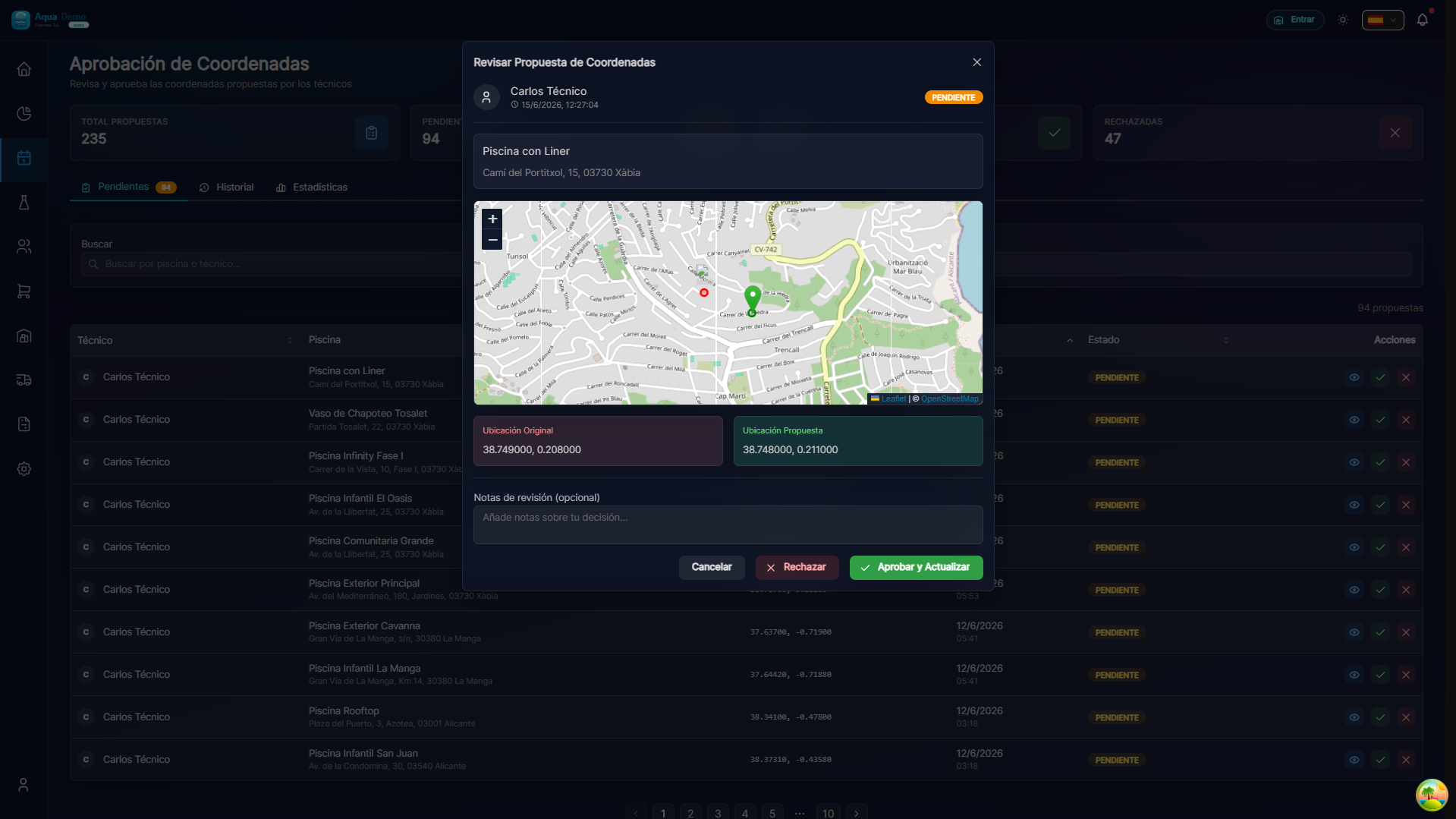
Captura con datos demo AquaDemo.Capture with AquaDemo demo data.
Level: 🟢 Easy
When your cell phone can't find the pool or takes you to the wrong place
🎯 Most common problems
| Problem | Symptom | Quick fix |
|---|---|---|
| GPS disabled | "Activate location" | Settings → Location → Activate |
| Address not found | "Address not found" | Set manual coordinates |
| Incorrect coordinates | It takes you to another street | Correct pin on map |
| Blank map | The map is not visible | Check internet connection |
📝 Step by step solution
Problem: "Turn on location"
Why it happens: The mobile phone has its GPS turned off.
Solution:
Android:
- Swipe from above (notifications)
- Look for the "Location" or "GPS" icon
- Press to activate it
iPhone:
- Settings → Privacy → Location
- Activate "Location Services"
In the PoolControl app:
- When it asks for location permission, hit "Always allow"
- If it does not appear: Mobile settings → Apps → PoolControl → Location → Allow
Problem: "Can't find address"
Why it happens: The address is misspelled or it is a new development that is not on the maps.
Solution:
Use exact GPS coordinates:
- On Google Maps, search for the pool
- Press and hold the exact point
- Copy the coordinates (ex: 36.7213, -4.4215)
- Paste it into PoolControl
If it is a new development:
- Ask the client to send you their location via WhatsApp
- Open the link in Google Maps
- Copy the coordinates
On the computer (administrator):
- Go to Clients → Pool
- "GPS Coordinates" field
- Put exact latitude and longitude
- Save
Problem: "The pin is incorrectly set"
Why it happens: The coordinates are wrong or approximate.
Solution (as a technician):
1. Estás en la piscina correcta
2. Abre la app → Mi Ruta → Esta piscina
3. Pulsa el icono de GPS 🛰️
4. Selecciona "Proponer nuevas coordenadas"
5. El sistema envía la ubicación exacta donde estás
6. El administrador lo revisa y aprueba
Note: You don't change the coordinates, you just propose. The admin must approve it.
Problem: "Map blank or gray"
Why it happens: There is no internet connection to load the map.
Solution:
Activate mobile data (the map requires internet)
Wait a few seconds (sometimes it takes a while to load)
If still blank:
- Close the app completely
- Open it again
- Wait for it to load
Alternative without map:
- Use Google Maps separately
- Look for the address there
- Navigate with Google Maps
- In PoolControl you only mark the work done
🔧 Improve GPS accuracy
If the GPS has you "jumping" from one place to another:
On mobile:
Activate high precision GPS:
- Settings → Location → Mode → High precision
- Use GPS + WiFi + mobile networks
Restart the mobile:
- Sometimes the GPS gets "stuck"
- Turning off and on solves a lot
Clean the antenna:
- The back of the phone (where the camera is)
- Remove the cover if it is thick
In the app:
- Wait 10-20 seconds for the GPS to "stabilize"
- Do not check "Start Job" until the position is correct
❓ Frequently asked questions
"Does GPS use a lot of battery?"
Yes a bit. But PoolControl only uses GPS when you check "Start Job", not all day.
"Can I work without GPS?"
Yes, but you will not be able to mark that you are in the pool. You will have to notify the admin.
"Is the boss monitoring me with GPS?"
It only knows your location when you check "Start Job" and "End Job." He doesn't watch you all day.
"Why do you sometimes tell me I'm far away if I'm in the pool?"
GPS may have a margin of error of 5-10 meters. If it is a large villa, the pin may be in the house and you in the pool. The admin can expand the tolerance radius.
✅ GPS Checklist
Before leaving:
- [ ] GPS activated on the mobile
- [ ] PoolControl has location permission
- [ ] Mobile data activated (for the map)
In the pool:
- [ ] Wait for the GPS to stabilize
- [ ] Check that the location is correct
- [ ] If it is wrong, propose correction
📍 Accurate GPS = Getting to work safely
Without GPS, there is no route. Configure it well and you will save time.